How to apply for an instrument rating (AUW not exceeding 5,700 kg) on eGCA
An instrument rating lets you fly by reference to instruments rather than by outside visual cues, which is what makes flight in cloud and low-visibility conditions possible and legal. For pilots in India, the rating is added to your licence through eGCA, the Directorate General of Civil Aviation (DGCA) online platform. This guide covers the instrument rating service for aircraft with an all-up weight (AUW) not exceeding 5,700 kg, which is the category most early-career pilots apply under.
The guide does two things. First, it explains what AUW means and why the 5,700 kg figure keeps appearing in aviation rules, because that threshold decides which version of the service you use. Second, it walks through the eGCA application itself as a numbered set of steps you can follow with the portal open in another tab.
What AUW means in aviation, and the 5,700 kg threshold
AUW stands for all-up weight: the total weight of the aircraft at a given moment, including the airframe, fuel, crew, passengers, and any cargo. It is the same idea that other frameworks describe as gross weight, and the maximum value an aircraft is certified for is its maximum all-up weight or maximum take-off weight (MTOW). When a rule refers to “AUW not exceeding 5,700 kg”, it is talking about the certified maximum, not the weight on any particular day.
The 5,700 kg figure (roughly 12,500 lb) is a long-standing dividing line in aviation regulation. [VERIFY] Aircraft at or below it are generally treated as light aircraft, and many licensing, rating, and operational rules are written separately for the “not exceeding 5,700 kg” category and the “exceeding 5,700 kg” category. [VERIFY] For instrument rating purposes this matters because eGCA offers the service split along this threshold, so you select the version that matches the aircraft type endorsed on your licence. If you train and fly light single or twin-engine aircraft, the not-exceeding-5,700 kg service is almost always the one you need.
Knowing where your aircraft sits relative to this line saves time. Applying under the wrong category, or against a type that is not endorsed on your licence, is one of the more common reasons an application stalls.
Before you apply: prerequisites
eGCA validates your application against the records DGCA already holds, so the application goes more smoothly when those records are complete first. A few things are worth confirming before you start.
- Aircraft type endorsement. The aircraft type you are seeking the instrument rating for should already be endorsed on your Commercial Pilot Licence (CPL). [VERIFY] If it is not, that endorsement is the prerequisite to sort out first.
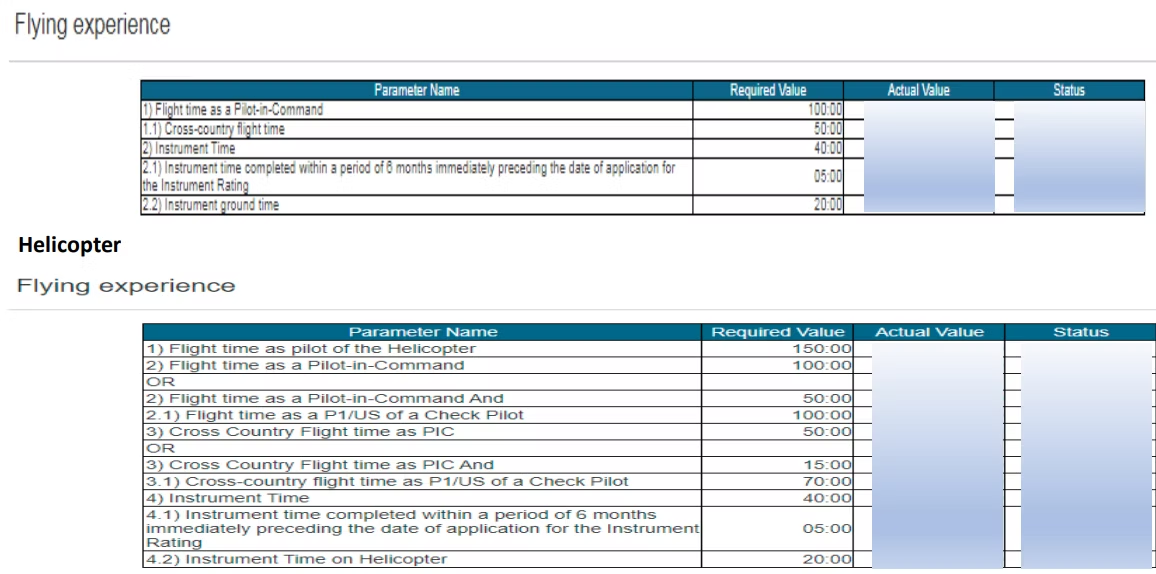
- Flying experience and e-logbook. You need the flying experience required for the rating, recorded in a logbook that is complete and, where applicable, approved. [VERIFY] DGCA publishes a user manual on filling the e-logbook, and it is worth following it closely because gaps or unapproved entries are a frequent source of discrepancies.
- Applicable rules. The instrument rating requirements sit within Schedule II of the Aircraft Rules, 1937. [VERIFY] Reading the sections that apply to your rating before you start means the form’s questions make sense as you go.
If your supporting records, such as medical and English Language Proficiency (ELP) details, are current, the form mostly becomes a matter of verifying what is already on file rather than entering everything from scratch.
How to apply for an instrument rating on eGCA
With your eGCA login and supporting documents ready, the application runs through the steps below. Portal labels and menu names can change over time, so treat the exact wording as a guide rather than a fixed script.
-
Log in to the eGCA portal. Sign in with your eGCA ID and password. If you do not have an eGCA account yet, set that up first using our guide on how to get your eGCA ID.
-
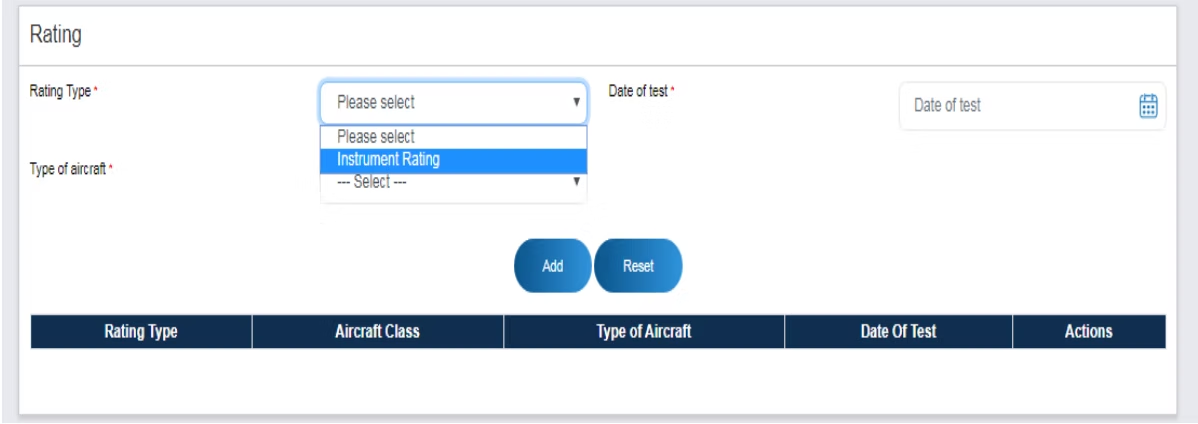
Open the instrument rating service. From the left-side panel, select the Instrument Rating option under the Services section. [VERIFY] Choose the version that matches your aircraft category, which for light aircraft is AUW not exceeding 5,700 kg.
-
Read the instructions and user manual. The service opens with an instruction page and a linked user manual. Reading these first tells you which documents you will be asked to upload and how the form is structured. [VERIFY]
-
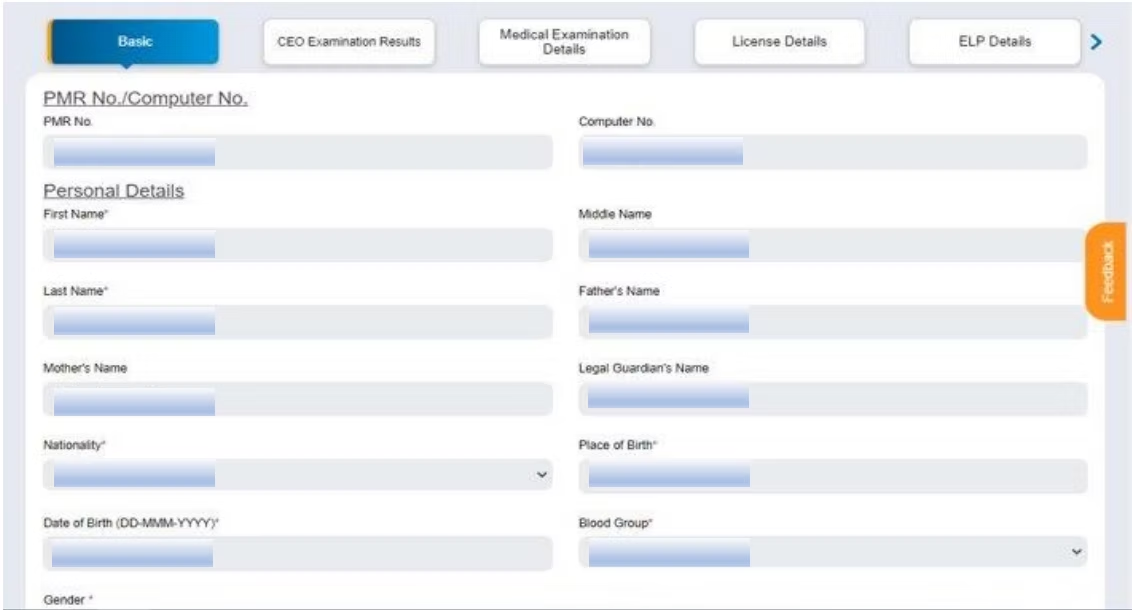
Verify and fill the application form. Check your basic details, examination details, medical examination details, ELP details, and licence details against what is shown. [VERIFY] Then provide the information specific to the instrument rating, including aircraft type, flying experience, and Radio Telephony Restricted (RTR) details. Complete the involvement in accident or incident section if it applies to you, and upload the required documents, such as your RTR certificate and medical certificate. [VERIFY]
-
Correct any discrepancies. If the portal flags a mismatch, resolve it through the route eGCA indicates, such as the DMS or digitised data updation support cell. [VERIFY] For licence-detail mismatches, the License Records Update option lets you submit corrections for DGCA validation. [VERIFY]
-
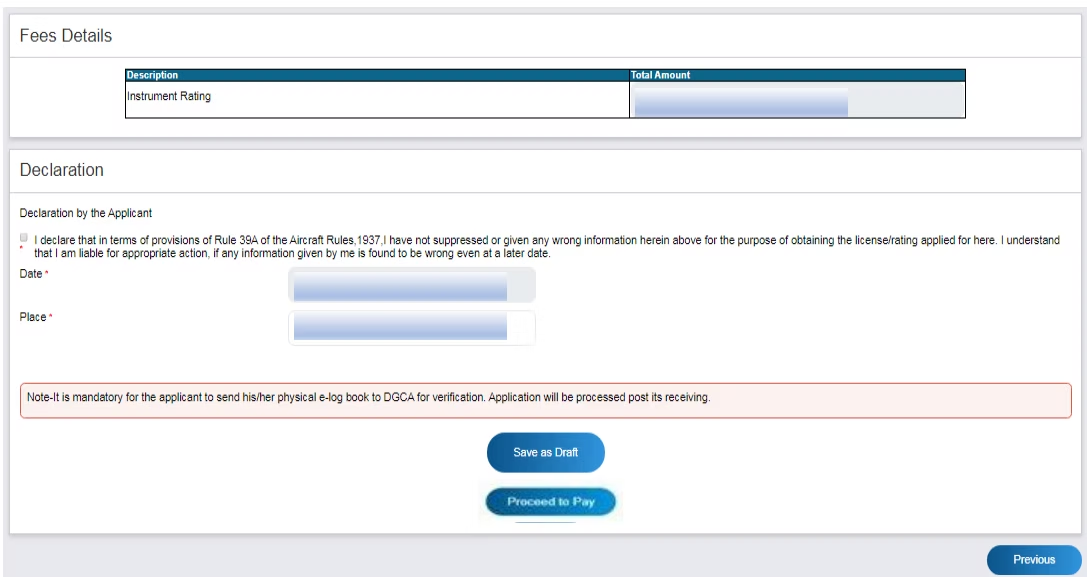
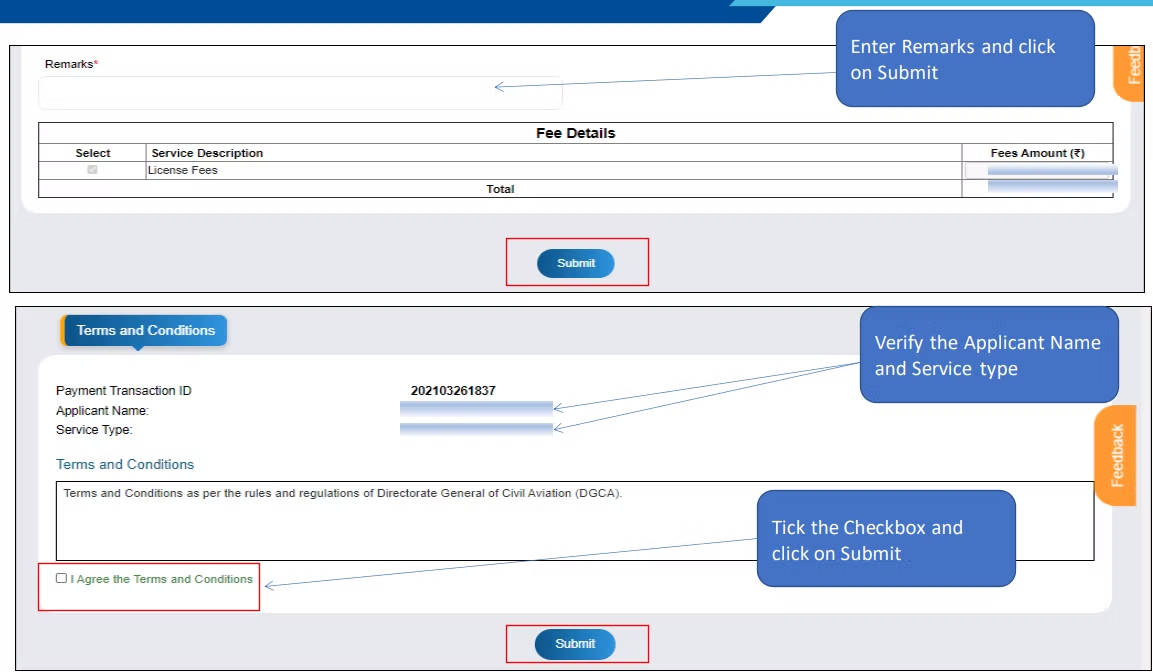
Pay the fee. Proceed to the payment gateway, Bharatkosh, and pay the fee for the instrument rating service. [VERIFY] A payment receipt is generated once the payment goes through.
-
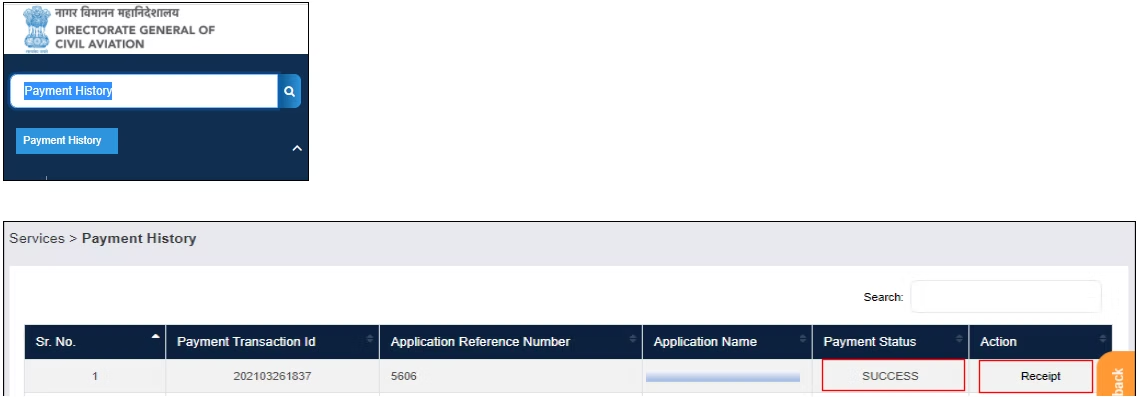
Track your application. The receipt stays visible on the portal after payment, and you can follow progress through the License Request Details option. [VERIFY]
The application flow at a glance

If a step does not behave as described, the most common cause is a record that is incomplete on the DGCA side rather than a problem with the form itself. Resolving the underlying record, then returning to the application, is usually faster than retrying the same submission.
Why your logbook does the heavy lifting here
The instrument rating application leans heavily on flying experience, and that experience only counts if it is recorded accurately and can be evidenced. An e-logbook that is complete, consistent, and easy to summarise turns the experience part of the form from a scramble into a lookup.
This is where a digital logbook earns its place. Wingman is a pilot logbook used by 30,000+ pilots across 400+ airlines, and it keeps your hours, currency, and licence details in one place across iOS, Android, and Web. It can import your roster automatically from systems such as AIMS eCrew, NavBlue RAIDO, CAE Crew Access, ARMS, CESAR, Sabre, FLICA, and PDC CrewConnex, so your flight times build up without manual re-entry, and it produces regulator-compliant exports for DGCA among others including the FAA, EASA, UK CAA, GCAA, GACA, NZCAA, HKCAD, CASA, and CAAS.
For India specifically, there is a focused walkthrough on keeping a DGCA pilot logbook in India. There is a free tier up to 250 logged hours, so you can keep your records clean while you are still building toward the rating without committing anything up front, and you can start in the app whenever you are ready.
How the instrument rating fits the wider DGCA journey
The instrument rating is one step in a longer sequence that runs through both of DGCA’s main systems. Examinations are handled on the Pariksha portal, while licences and ratings, including this one, are processed through eGCA. If you are still setting up on eGCA, our guides on how to get your eGCA ID and the wider pilot registration process with eGCA explain how the platform is structured.
On the examination side, it helps to know which papers sit behind each licence and rating before you plan your sittings, which we cover in exams to be cleared in order to get CPL, PPL, ATPL, and once you have sat them you can confirm outcomes by following how to check your exam results on the Pariksha DGCA website. Keeping the examination and licensing sides in step is what lets the instrument rating application validate cleanly when you reach it.
Frequently asked questions
What does AUW not exceeding 5,700 kg mean for the instrument rating?
AUW is all-up weight, the total certified weight of the aircraft including airframe, fuel, crew, and load. The 5,700 kg figure is a regulatory dividing line that separates light aircraft from heavier ones. [VERIFY] The eGCA instrument rating service is offered separately for each side of that line, so you choose the not-exceeding-5,700 kg version when your endorsed aircraft type falls in the light category.
Do I need the aircraft type on my licence before applying?
In most cases the aircraft type for which you are seeking the instrument rating should already be endorsed on your CPL. [VERIFY] If the type is not yet endorsed, sorting that out first prevents the application from stalling on a mismatch.
What documents does the eGCA instrument rating application ask for?
The form draws on your existing basic, examination, medical, ELP, and licence details, and asks you to add aircraft type, flying experience, and RTR details. You are typically asked to upload supporting documents such as your RTR certificate and medical certificate. [VERIFY] The exact list is shown on the instruction page when you open the service.
How do I pay and track the application?
Payment is made through the Bharatkosh gateway, and a receipt is generated once it succeeds. [VERIFY] You can follow progress afterwards through the License Request Details option on the portal. [VERIFY]
How should I record the flying experience the application needs?
Keep a complete e-logbook as you fly, following the DGCA user manual for entries and approvals where required. [VERIFY] A digital logbook such as Wingman keeps hours and currency in one place and produces DGCA-compliant exports, which makes the experience section of the application a lookup rather than a reconstruction.
← All articles