CFI approval on eGCA: requirements, documents, and the step-by-step process
CFI approval is the process a Flying Training Organisation (FTO) in India uses to have a Chief Flight Instructor formally recognised by the Directorate General of Civil Aviation (DGCA). Like most DGCA licence and approval workflows, it now runs through eGCA, the online platform DGCA uses for pilot and organisation services. This guide explains who can apply, what you need in place before you start, the documents the system expects, and the exact sequence of steps inside the eGCA portal.
If you are coming to this from the instructor side rather than the FTO side, it helps to know where CFI approval sits in the wider chain. A Chief Flight Instructor is normally drawn from the ranks of approved instructors at the organisation, so the Deputy Chief Flight Instructor (Dy.CFI) and Flight Instructor Rating steps usually come first. We cover the related Dy.CFI approval on eGCA and the flight instructor rating (FIR) application in eGCA in their own walkthroughs, and reading those alongside this one gives you the full picture.
What CFI approval on eGCA is
The Chief Flight Instructor is the senior instructor responsible for the standard and conduct of flying training at an FTO. Before a candidate can act in that role, the organisation has to submit an application and the candidate has to be approved by DGCA. eGCA is where that application is raised, routed for internal concurrence, and submitted to the regulator for processing.
The application is initiated by the FTO using its own eGCA account, not by the candidate acting alone. It then passes to the existing Dy.CFI for concurrence before it reaches DGCA. That two-party flow is the part most first-time applicants get wrong, so it is worth understanding the sequence before you log in.
Prerequisites before you apply
A CFI application will only move smoothly if a few things are already in place. Confirm all of the following before you start, because eGCA validates several of them at submission and the application can stall if any are missing.
- The candidate already holds a Dy.CFI position. CFI candidates are normally serving Deputy Chief Flight Instructors at the organisation, so the Dy.CFI approval needs to be complete first. [VERIFY]
- Both the FTO and the Dy.CFI are registered on eGCA. Each needs a valid eGCA ID on the external portal. If your organisation is not yet set up, see new flying training organisation registration on eGCA, and for individual setup see how to get your eGCA ID.
- Valid contact details are on record. A working email ID and mobile number for both the FTO and the Dy.CFI matter, because eGCA uses them for notifications and OTP-based confirmations during the workflow.
- The candidate’s instructor credentials are current. A CFI candidate is expected to hold a valid Commercial Pilot Licence or Airline Transport Pilot Licence with a current Flight Instructor Rating and a valid Class 1 medical. [VERIFY]
Documents you need to upload
The original short version of this guide pointed readers to a DGCA PDF without listing what to prepare. The list below sets out the documents an FTO typically attaches to a CFI application so you can have them scanned and ready before you open the form. Treat this as a preparation checklist and confirm the exact set against the current eGCA upload screen and the DGCA Civil Aviation Requirements, as the portal’s accepted document list can change. [VERIFY]
- The candidate’s CPL or ATPL and a copy of the current Flight Instructor Rating. [VERIFY]
- A valid Class 1 medical assessment. If a renewal is due, our guide on Class 1 medical renewal on eGCA covers that step.
- Logbook extracts evidencing total flying experience and instructional hours, in line with the experience the role requires. [VERIFY]
- The candidate’s eGCA ID or PMR number, used to auto-populate their details on the form.
- Any organisation-specific letter or board resolution nominating the candidate as Chief Flight Instructor, if your FTO’s procedures require one. [VERIFY]
Scan documents as clear PDFs and keep each file within the size limit the upload field states. Naming each file plainly, for example “FIR-certificate” or “Class1-medical”, makes the upload step faster and reduces the chance of attaching the wrong file.
How to apply for CFI approval on eGCA
With prerequisites met and documents ready, the application itself is a short, ordered process. Work through it with the portal open in another tab. Field and menu labels below are taken from the standard eGCA CFI approval flow and may differ slightly from what you see, so read each screen as you go. [VERIFY]
-
Open the official DGCA website at www.dgca.gov.in and select the eGCA login option to reach the external portal.
-
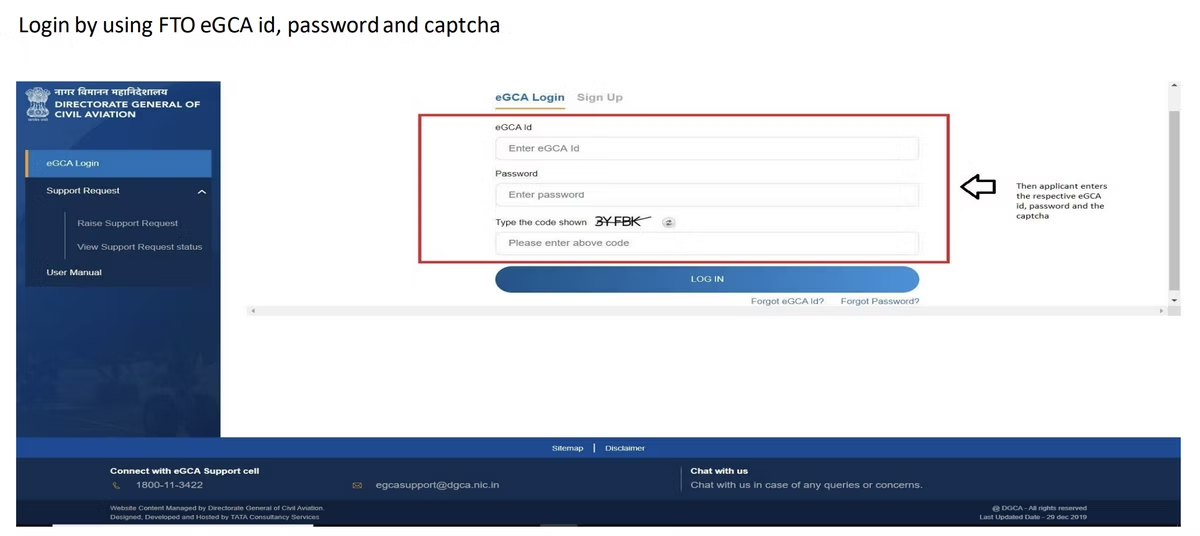
Log in using the FTO’s eGCA ID, password, and captcha. The application is raised under the organisation’s account, not the candidate’s.
-
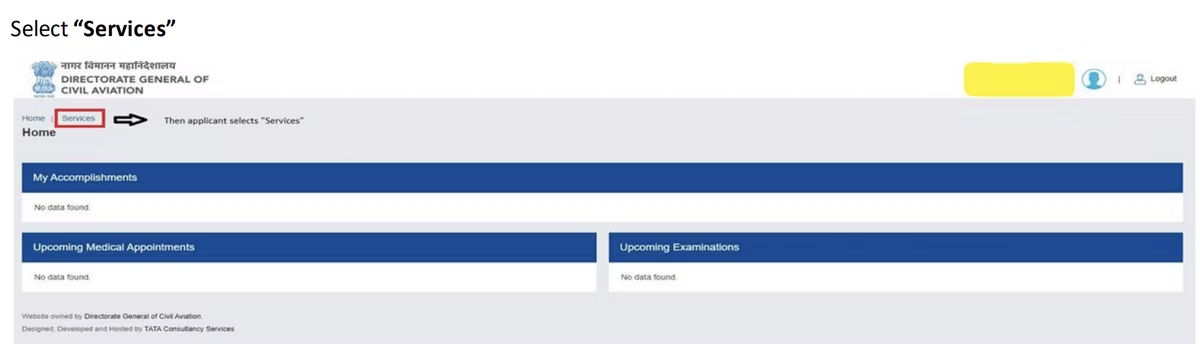
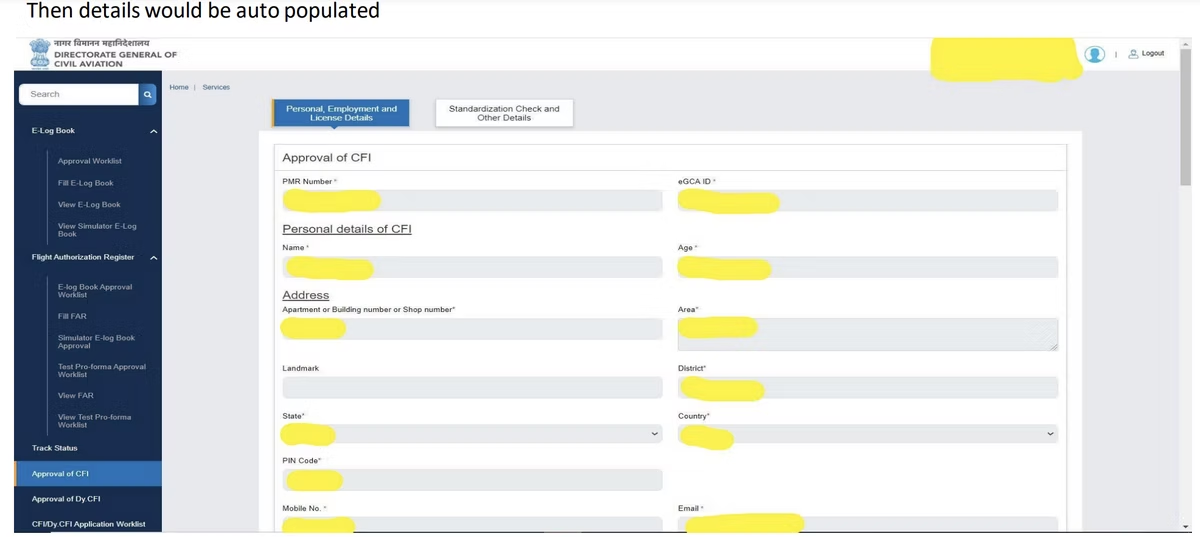
From the dashboard, open the Services tab and select the Approval of CFI service. [VERIFY]
-
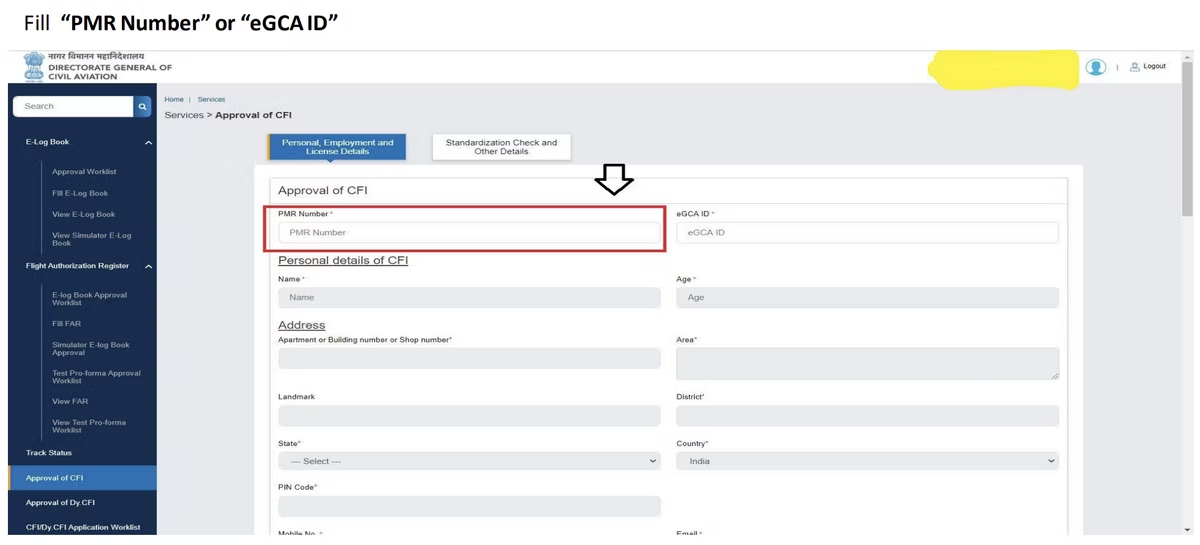
Enter the candidate’s PMR number or eGCA ID so the system auto-populates their details. Check that the name, licence, and rating shown match the candidate’s records before continuing.
-
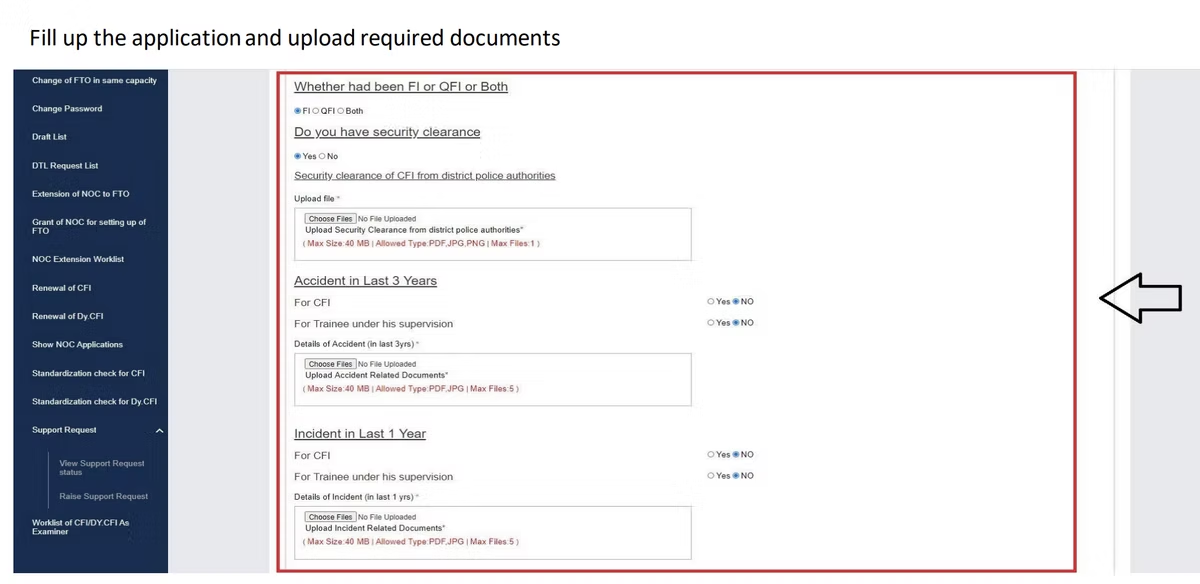
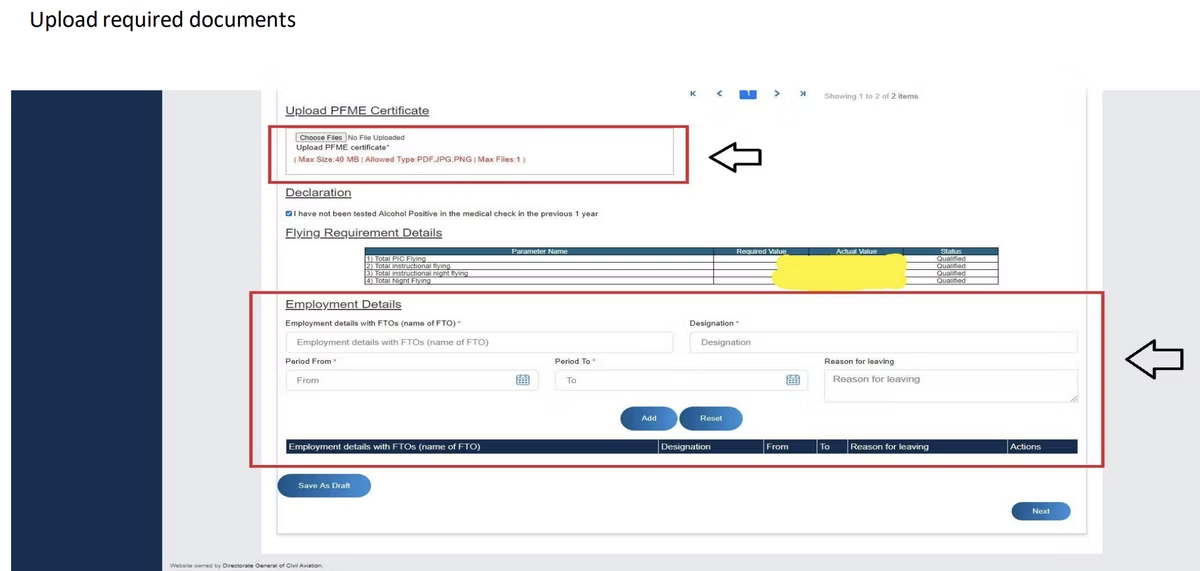
Complete the application form with the required information and upload the supporting documents in the fields provided. Confirm each attachment has loaded before moving on.
-
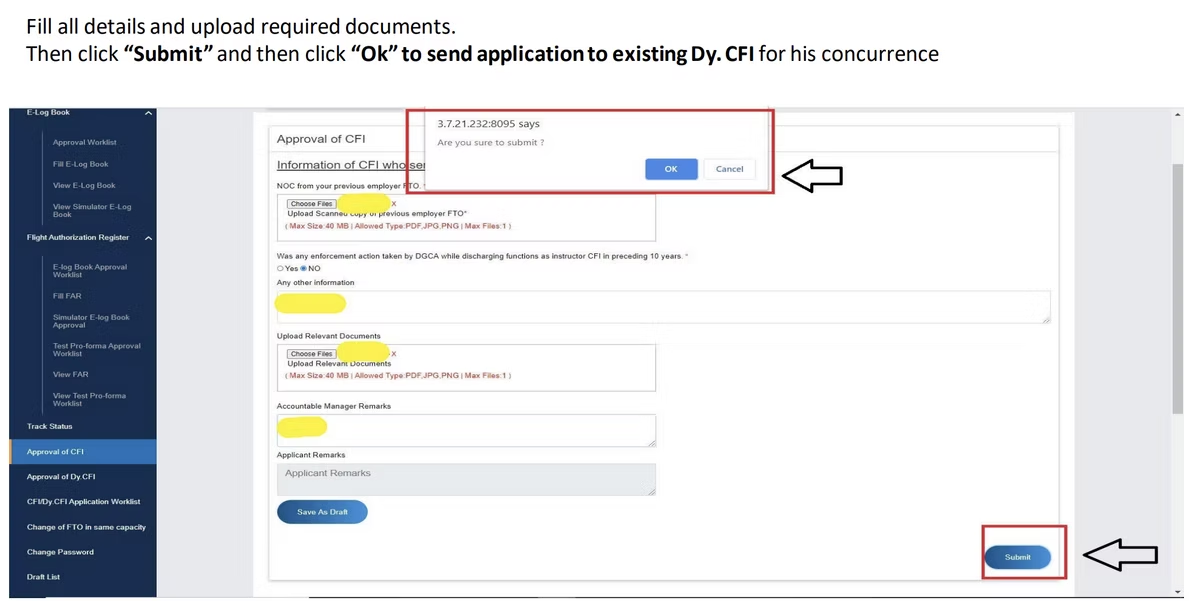
Review every field and declaration, then click Submit. Confirm the submission when prompted so the application is sent to the existing Dy.CFI for concurrence. [VERIFY]
-
The Dy.CFI logs in to eGCA, opens the CFI/DyCFI Worklist, and selects View Application. After checking the details and the declaration, the Dy.CFI clicks Submit to forward the application back to the FTO and on to DGCA for processing. [VERIFY]
Once submitted to DGCA, the application is processed by the regulator. Track its status from the same worklist rather than re-submitting, and respond promptly if DGCA raises a query against it.
CFI approval flow on eGCA

After approval: keeping instructional hours in order
CFI approval rests heavily on documented experience, and that places the spotlight on how flying and instructional time is recorded. A senior instructor’s logbook is consulted not just for this approval but for renewals, audits, and the records of every trainee they sign off, so accuracy matters more in this role, not less.
This is where a digital logbook earns its place. Wingman is a pilot logbook used by 30,000+ pilots across 400+ airlines, and it keeps hours, currency, and licence details in one place across iOS, Android, and Web. It is a global product rather than an India-only tool, and it supports DGCA among regulators including the FAA, EASA, UK CAA, GCAA, GACA, NZCAA, HKCAD, CASA, and CAAS, with regulator-compliant exports for each.
For India specifically, there is a focused walkthrough on keeping a DGCA pilot logbook in India, and a separate guide on uploading your logbook to eGCA for when records need to go into the portal. There is a free tier up to 250 logged hours, so an instructor or trainee can start keeping clean records without committing anything up front, and move to the Pro tier (₹4,499 per year in India, or $59 per year billed annually elsewhere) when they need automatic roster import and the full export set.
How CFI approval fits the wider eGCA picture
CFI approval is one service among many that an FTO and its instructors use on eGCA. The platform also handles the Dy.CFI approval that usually precedes it, the flight instructor rating application that qualifies an instructor in the first place, and organisation-level steps like new FTO registration and chief ground instructor registration. If you are still finding your way around the platform, the eGCA registration process step by step is a good orientation. Knowing how these services relate to each other helps an FTO keep its instructor approvals current and its records consistent.
Frequently asked questions
Who initiates a CFI approval application on eGCA?
The Flying Training Organisation initiates it using its own eGCA account. The candidate does not raise the application alone. After the FTO submits, the application goes to the existing Dy.CFI for concurrence and then on to DGCA for processing. [VERIFY]
What is the difference between CFI and Dy.CFI approval?
They are two separate eGCA services for two different roles. The Deputy Chief Flight Instructor approval is normally completed first, because CFI candidates are typically serving Dy.CFIs at the organisation. We cover the Dy.CFI approval on eGCA in its own guide. [VERIFY]
Which eGCA service do I select for CFI approval?
Log in with the FTO account, open the Services tab, and select the Approval of CFI service. From there you enter the candidate’s PMR number or eGCA ID to auto-populate their details and complete the form. [VERIFY]
What documents should I prepare before applying?
Typically the candidate’s CPL or ATPL with a current Flight Instructor Rating, a valid Class 1 medical, and logbook extracts evidencing total and instructional flying experience, plus any nomination letter your FTO’s procedures require. Confirm the exact list against the eGCA upload screen, as accepted documents can change. [VERIFY]
Where do I track the application after submission?
Both the FTO and the Dy.CFI can follow the application from the CFI/DyCFI Worklist in eGCA. Track its status there rather than submitting again, and respond promptly if DGCA raises a query against the application. [VERIFY]
← All articles