Chief ground instructor registration on eGCA: a step-by-step guide
eGCA is the online platform run by the Directorate General of Civil Aviation (DGCA) in India for licence, registration, and approval processes. If you want to be recognised as a Chief Ground Instructor (CGI) and you do not hold a Pilot Medical Registration (PMR) number, this is the system where you create your account and start that process. The portal is reached through the official DGCA website, and the sign-up flow is slightly different for applicants without a PMR number, which is what this guide covers.
This walkthrough explains what the Chief Ground Instructor registration is for, what you need ready before you start, and the steps to create your eGCA account without a PMR number. The steps are written as a numbered how-to you can follow with the portal open in another tab.
What chief ground instructor registration on eGCA is for
A Chief Ground Instructor oversees ground training at an approved training organisation and is responsible for the theoretical knowledge instruction that prepares candidates for their examinations and licences. To interact with DGCA as a CGI, you first need an identity on eGCA. Registration creates that identity and gives you access to the services DGCA delivers through the portal.
The reason there is a separate path for applicants without a PMR number is straightforward. A PMR number is generated when a person holds a DGCA medical record, which pilots and several other categories have. A Chief Ground Instructor is a ground role and does not necessarily hold a PMR number, so eGCA provides a sign-up route that does not depend on one. Selecting the correct option during sign-up is the single most important choice in the flow, because it determines which fields the portal asks you to complete.
If you already hold a PMR number from an earlier DGCA medical, you would answer the PMR question differently and the portal would pull some of your details from existing records. This guide assumes you are registering without a PMR number.
Before you start: prerequisites
A registration that fails part way through is almost always down to something that was not ready before sign-up began. Sorting these first saves a second attempt.
- A valid personal email address that has not already been registered on eGCA. The portal ties one account to one email, so a previously used address will be rejected. [VERIFY]
- A mobile number that has not already been registered on eGCA, since it is validated by one-time password (OTP) during sign-up. [VERIFY]
- A government identification document and its number, ready to upload as a clear image.
- A recent passport-style photograph and a scanned signature.
- Proof of both your permanent and correspondence addresses, ready to upload. [VERIFY]
Have these saved as clear files in the formats the portal accepts before you begin, so you are not hunting for documents while a session is open.
How to register as a chief ground instructor without a PMR number on eGCA
Follow these steps in order. The flow is short, but each step depends on the one before it.
-
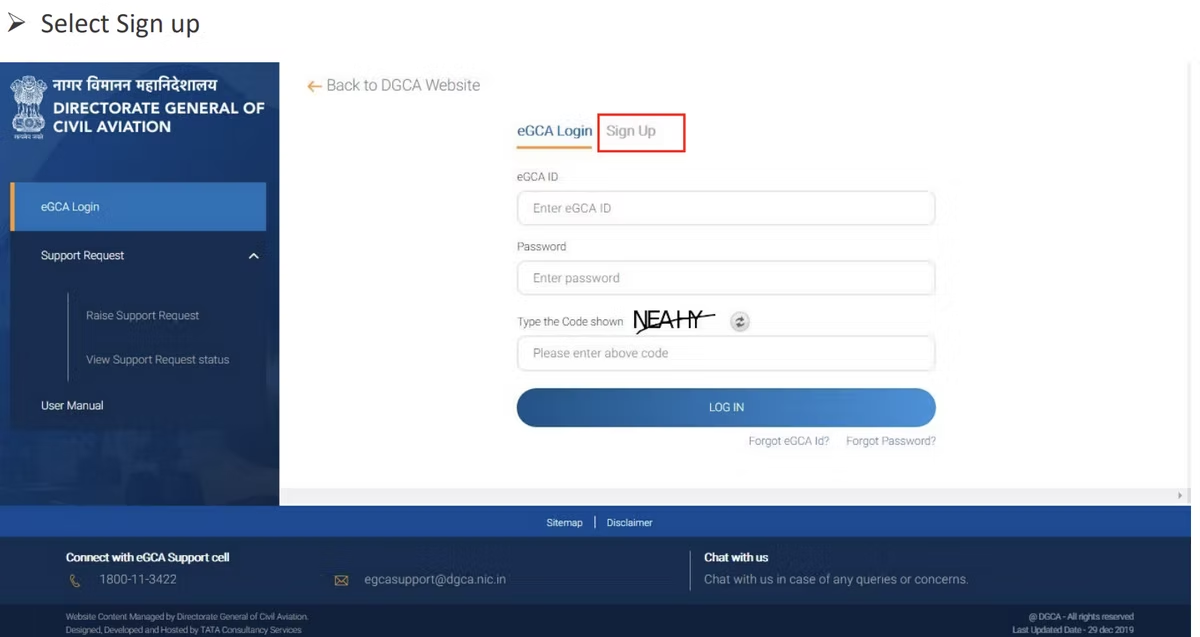
Open the official DGCA website at https://www.dgca.gov.in and select the eGCA login option. This opens the eGCA portal where registration begins. [VERIFY]
-
On the eGCA portal, select Sign Up. This starts a new registration rather than logging in to an existing account.
-
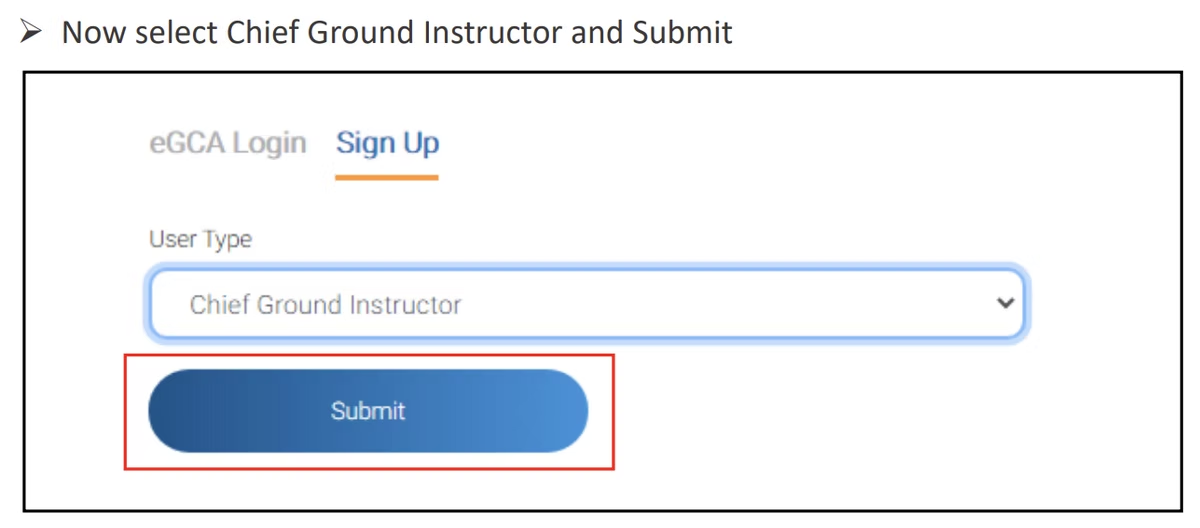
Choose the Chief Ground Instructor category from the registration options, then submit your selection. Picking the correct category here sets the rest of the form.
-
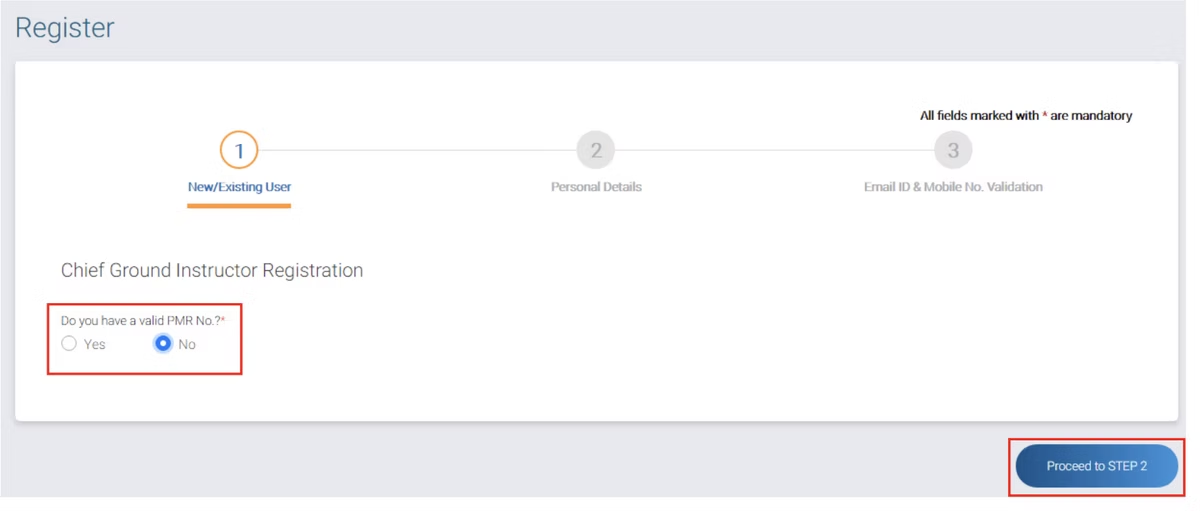
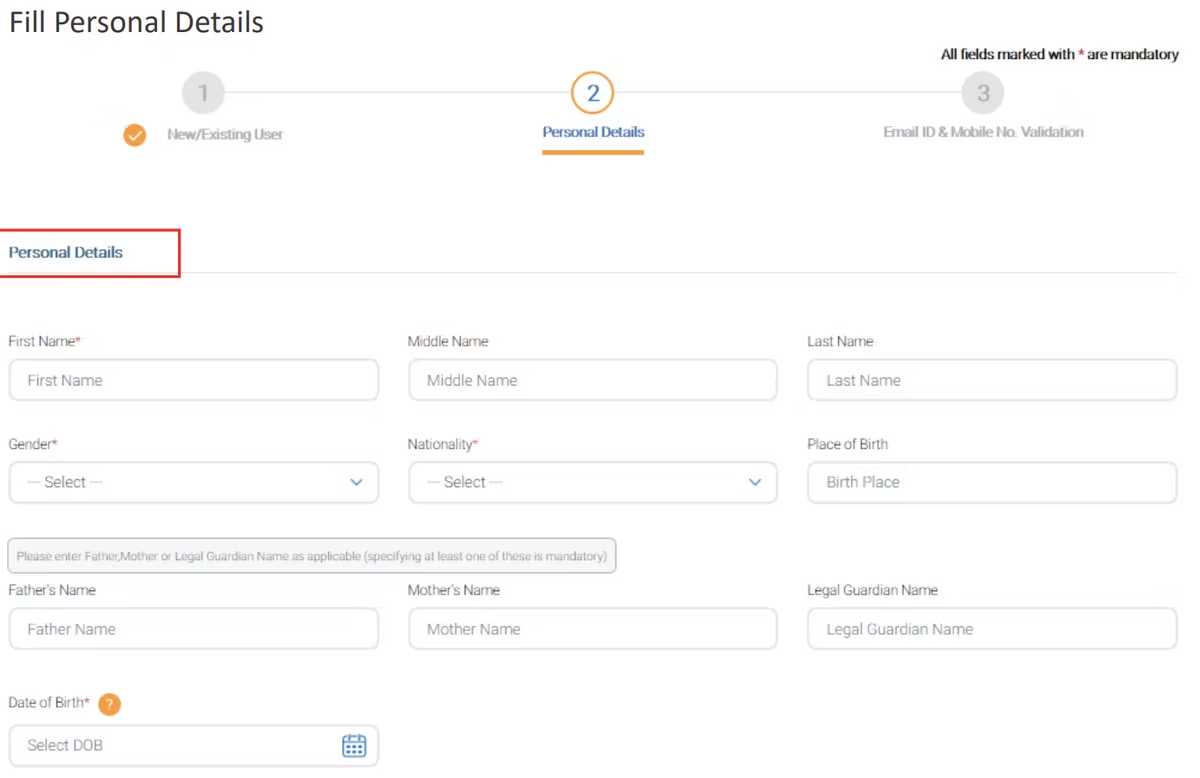
When asked whether you hold a valid PMR number, select No. Then enter your personal details as requested. This is the step that routes you down the no-PMR path.
-
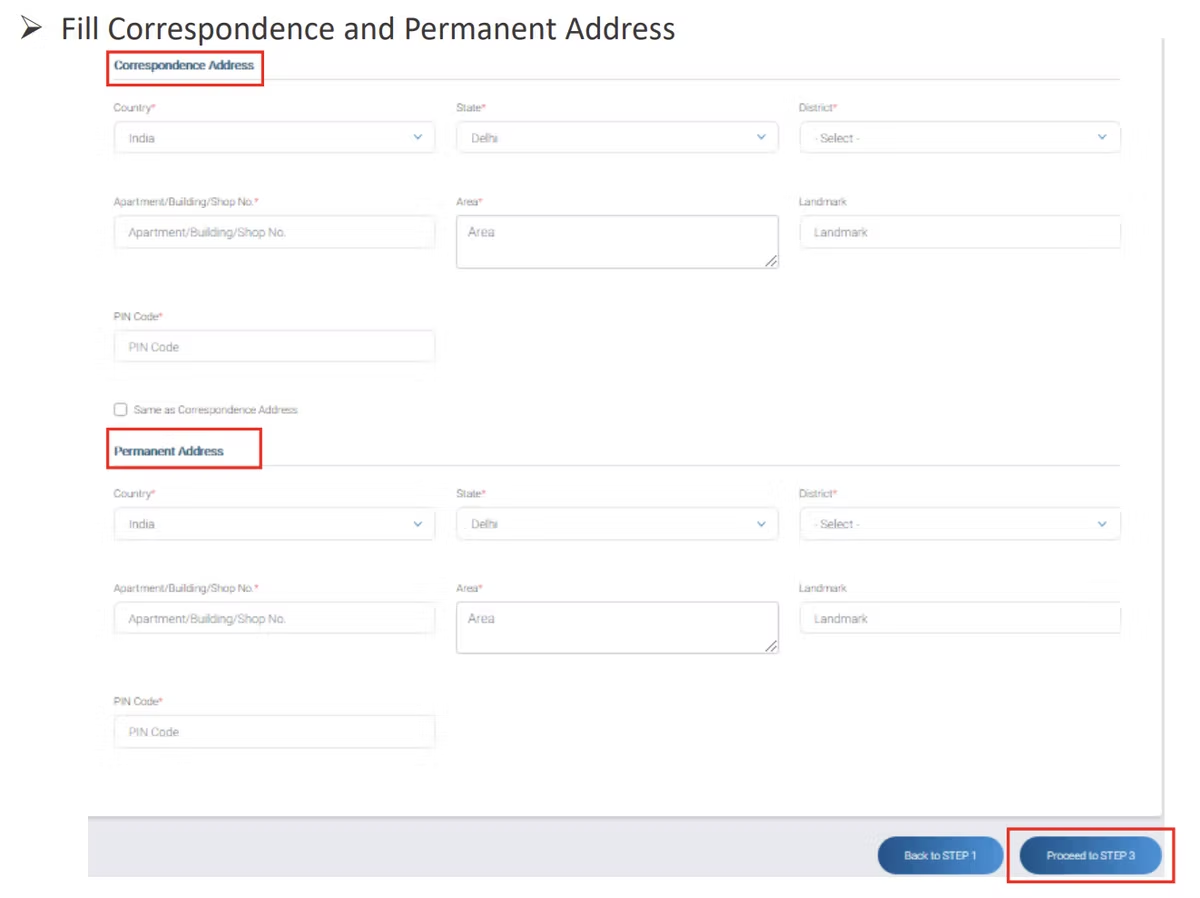
Fill in your correspondence address and your permanent address. Enter both accurately, because address proof is checked later in the flow.
-
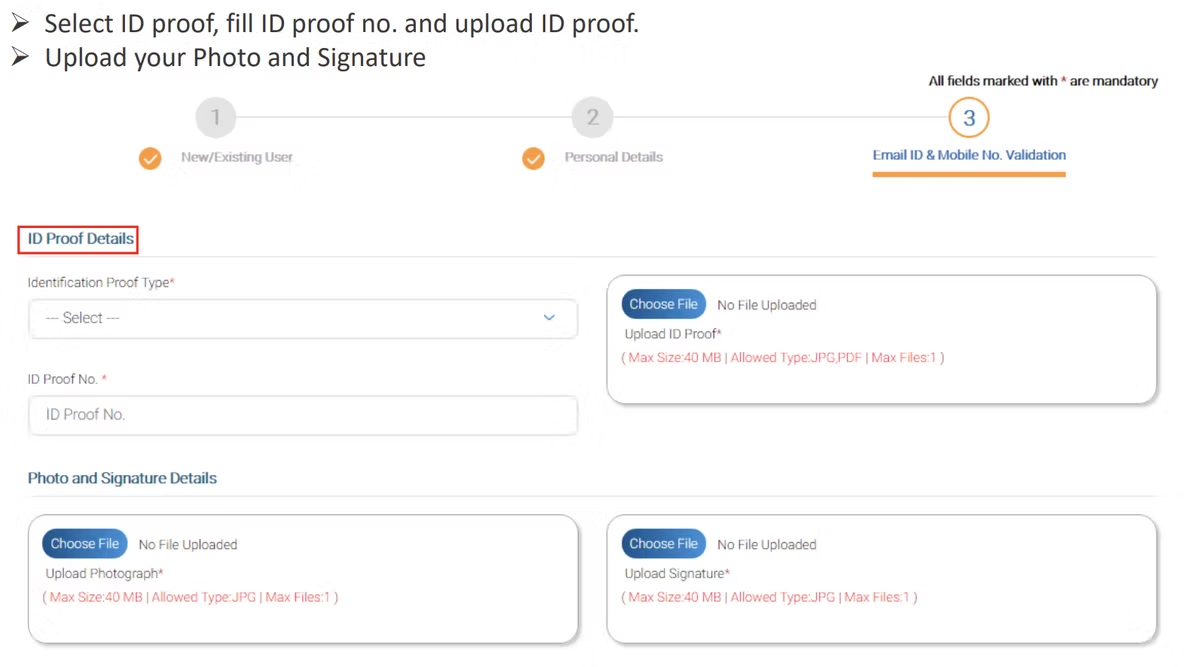
Choose your identification type, enter the identification number, and upload a clear image of the document. Upload your photograph and your signature in the same step.
-
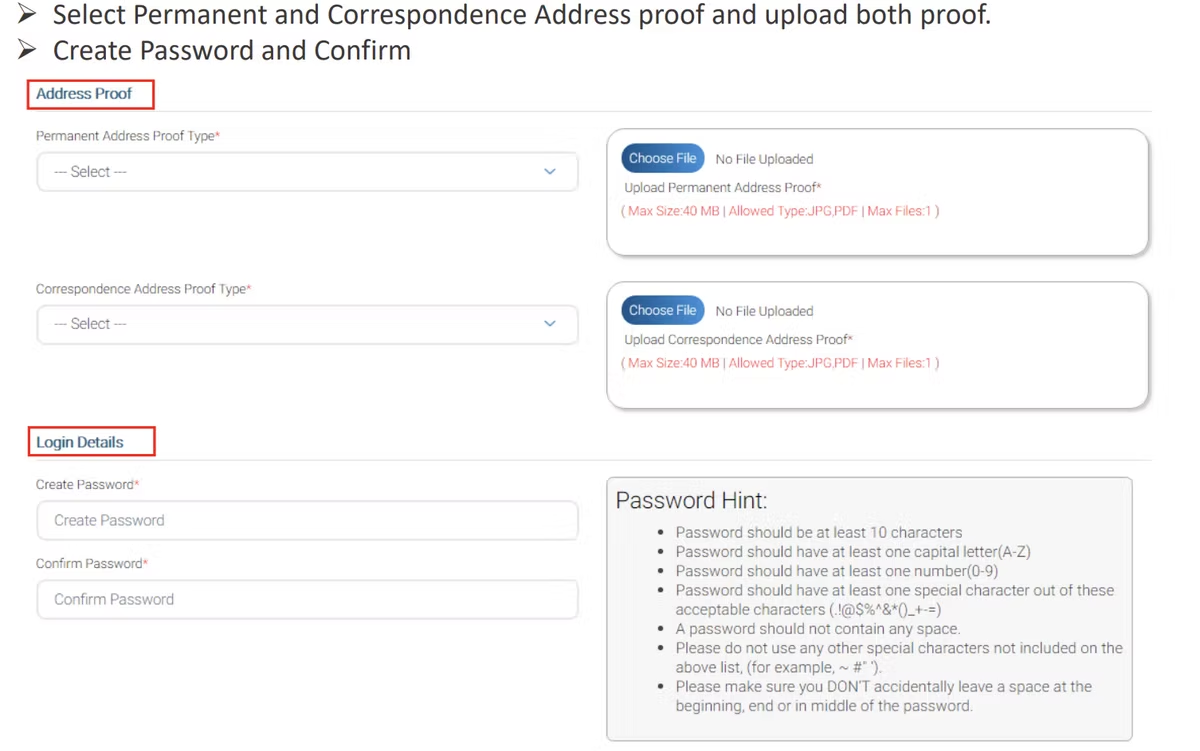
Upload proof of both your permanent and correspondence addresses for verification. Then create a secure password for your eGCA account and confirm it.
-
Enter your email address and mobile number, and validate them by entering the OTP sent to your registered mobile number. Once both are validated, your registration as a Chief Ground Instructor without a PMR number is complete.
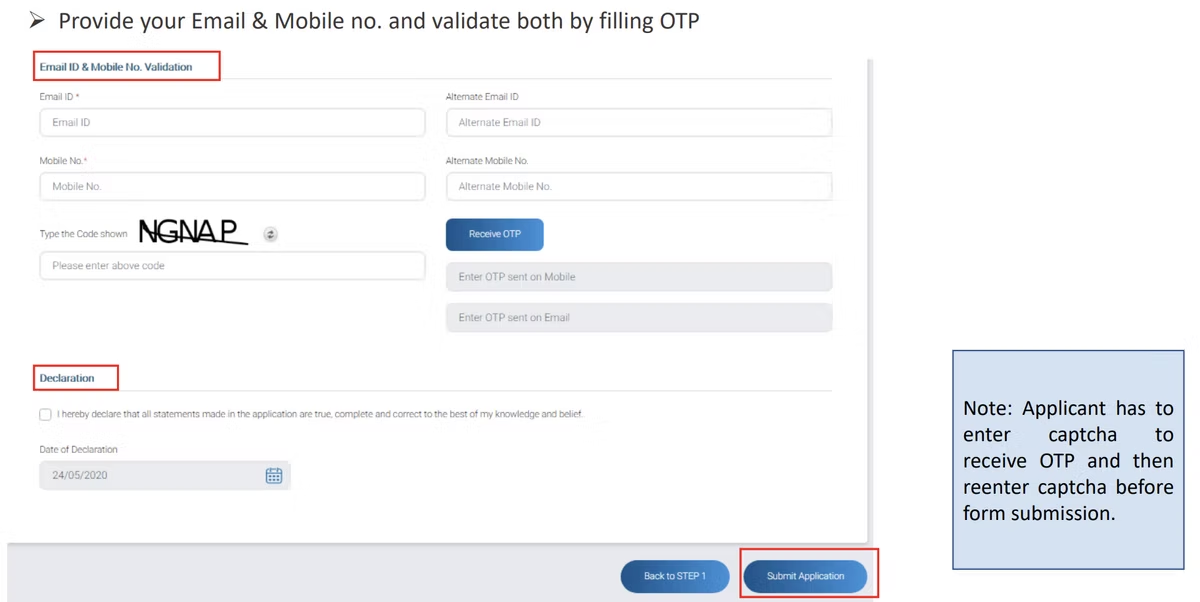
After this, you can log in to eGCA with the email and password you set and move on to the role-specific approvals that apply to you.
Registration flow at a glance

If a step will not advance, the usual causes are an email or mobile number already on the system, an upload that does not meet the portal’s format or size rules, or an OTP that has expired before it was entered. Re-request the OTP if it lapses rather than starting the whole form again. [VERIFY]
Documents to have ready
Pulling the requirements above into one checklist, you will need: a government identification document and its number, a recent photograph, a scanned signature, permanent address proof, and correspondence address proof. Keep these in clearly named files so you can find each one quickly during the upload step. Using current documents that match the details you type into the form avoids a mismatch at the verification stage.
Where chief ground instructor sits among eGCA roles
The Chief Ground Instructor registration is one of several distinct paths on eGCA, and it is easy to confuse roles that sound similar. They are separate registrations and approvals, not duplicates of each other, so use the one that matches the role you actually hold.
- If you are registering as a pilot rather than a ground instructor, the flow differs, and our pilot registration process on eGCA covers it step by step.
- For instructors moving into the Chief Flight Instructor role, see CFI application and approval on eGCA.
- For the deputy role, see Deputy CFI approval on eGCA.
- If you have not yet created your portal identity at all, how to get your eGCA ID explains the underlying account that the rest of these processes build on.
Knowing which of these applies to you keeps your records consistent and avoids starting the wrong registration.
Keeping flight records once you are training pilots
A Chief Ground Instructor works alongside the flying side of a training organisation, and the pilots you help prepare will spend the rest of their careers recording flight time accurately. A digital logbook is where that record lives. Wingman is a pilot logbook used by 30,000+ pilots across 400+ airlines, and it keeps hours, currency, and licence details in one place across iOS, Android, and Web.
Wingman is a global product rather than an India-only tool, and it produces regulator-compliant exports for DGCA alongside the FAA, EASA, UK CAA, GCAA, GACA, NZCAA, HKCAD, CASA, and CAAS. For the Indian context specifically, there is a focused walkthrough on keeping a DGCA pilot logbook in India. There is a free tier up to 250 logged hours, so a trainee can start recording from their first lessons without committing anything up front, and rosters import automatically from systems such as AIMS eCrew, NavBlue RAIDO, and CAE Crew Access once they reach an airline. You can create an account at app.wingmanlog.com.
Frequently asked questions
What is chief ground instructor registration on eGCA?
It is the process of creating a DGCA eGCA account in the Chief Ground Instructor category so you can be recognised as a CGI and access DGCA services through the portal. There is a specific sign-up route for applicants who do not hold a Pilot Medical Registration (PMR) number.
Can I register as a chief ground instructor without a PMR number?
Yes. During sign-up you select the Chief Ground Instructor category and answer No to the question about holding a valid PMR number. The portal then asks for your personal details, addresses, and documents rather than pulling them from a medical record. [VERIFY]
What documents do I need to register?
You need a government identification document and its number, a recent photograph, a scanned signature, and proof of both your permanent and correspondence addresses. Have these ready as clear files before you start so the upload step goes smoothly. [VERIFY]
My email or mobile number is being rejected at sign-up. Why?
eGCA ties one account to one email and one mobile number, so an address or number already registered on the system cannot be reused. Use an email and mobile number that have not previously been registered, and make sure you enter the OTP before it expires. [VERIFY]
Is chief ground instructor registration the same as CFI approval?
No. Chief Ground Instructor registration sets up your account for the ground instruction role, while Chief Flight Instructor (CFI) and Deputy CFI are separate approvals for the flying side. See our guides on CFI application and approval and Deputy CFI approval for those roles.
← All articles