DGCA logbook entry format: how to fill a pilot logbook entry that survives an audit
Filling a DGCA-compliant logbook entry is not complicated, but it is unforgiving. Every field has a defined purpose, and during an audit a DGCA inspector reads your logbook for internal consistency across entries, not only for whether each box contains something. The arithmetic has to reconcile down the page and across the columns. The format has to match the requirement. And the logbook has to be produced on demand during any DGCA inspection or audit, which means it is your record, in your custody, that an inspector examines, not a system you can fix later.
Pilot logbook requirements in India are set out in the Civil Aviation Requirements, CAR Section 7 Series B Part I, published on the DGCA official site. [VERIFY] This post explains the DGCA logbook entry format field by field, then takes one anonymised domestic sector from block off to a completed entry so you can see how to fill a DGCA pilot logbook entry in practice. It maps the order the fields are filled and the decisions that route time into the right columns, flags the five errors that most often trigger queries during a DGCA audit, and covers the special cases pilots ask about most: simulator sessions, instrument time, and repositioning. It closes on where paper and digital logging differ on format, and where digital enforcement helps.
What a DGCA logbook entry has to contain
A compliant entry is more than a list of flights. Each field carries information an auditor cross-references against the others, so a field left blank or filled loosely is not a small omission. The table below lists the fields a DGCA entry requires, what belongs in each, and why it matters.
| Field | What goes in it | Why it matters |
|---|---|---|
| Date | Date of the flight, recorded in UTC | Time across the entry is referenced to UTC, so the date follows UTC, not local |
| Aircraft type | The type you flew, for example B737-800 | Type and registration are both required per entry; one without the other is incomplete |
| Registration | The specific airframe registration | Ties the entry to an identifiable aircraft, not just a type |
| From / To | Departure and destination aerodromes | Defines the sector the times belong to |
| Block off | Time the aircraft moved under its own power, in UTC | Flight time is measured from here, not from rotation |
| Block on | Time the aircraft came to rest at the gate, in UTC | Closes the block period that defines flight time |
| Total flight time | Block to block, chocks off to chocks on | DGCA flight time is block-to-block, not airborne time |
| Day / Night split | Total apportioned between day and night | Night under DGCA runs from 30 minutes after sunset to 30 minutes before sunrise [VERIFY] |
| PIC time | Time as pilot in command | Total flight time alone is not sufficient; capacity must be disaggregated |
| Co-pilot time | Time as co-pilot | Records the sector flown in the right seat as required crew |
| Dual time | Instructional time received | Separates training time from line time |
| Instrument time | Actual or simulated instrument time | Supports instrument currency and rating records |
| Remarks | Approaches flown, role notes, anything an auditor would want context for | The field that explains the entry when a number alone does not |
Two points underpin the whole table. First, time is recorded in UTC, including the date, so an entry never mixes local and zulu. Second, total flight time on its own does not satisfy the requirement: PIC, co-pilot, dual, and instrument time must be disaggregated, and the disaggregated columns have to reconcile back to the total.
For paper logbooks, the mechanics matter as much as the content. Entries must be made in ink, correction fluid is not permitted, and any overwriting has to be initialled. [VERIFY] A clean digital record sidesteps that particular failure mode, but the format rules it has to satisfy are identical.
How a DGCA logbook entry comes together
The fields are filled in a fixed order, and a few decision points determine which columns carry time. Working through them in sequence is the reliable way to fill a DGCA pilot logbook entry without leaving a gap that an auditor will notice later.
- Record the date in UTC. The date follows the zulu clock, not your local one, so a sector that departs late evening IST may carry the next day’s UTC date.
- Enter the aircraft type and the specific registration together. Neither stands alone; an entry with a type but no airframe is incomplete on its face.
- Write the departure and destination aerodromes, which fix the sector the times belong to.
- Log block off and block on in UTC. These are the chocks-off and chocks-on times, not rotation and touchdown.
- Compute total flight time as block on minus block off. This is the block-to-block figure DGCA treats as flight time.
- Split the total between day and night using the 30-minutes-after-sunset to 30-minutes-before-sunrise window. Day plus night must equal the total. [VERIFY]
- Disaggregate the capacity columns. Decide whether the sector was flown as PIC, as co-pilot, or as dual instruction received, and place the time accordingly so the capacity columns reconcile to the total.
- Enter instrument time, actual or simulated, for the portion flown on instruments. This sits inside the sector total rather than adding to it.
- Finish in remarks: approaches flown, any unusual role, and anything that explains a number an auditor might otherwise question.
The decision flow below maps a completed flight through to a finished entry, showing where the routing choices fall.

Worked example: a single domestic sector
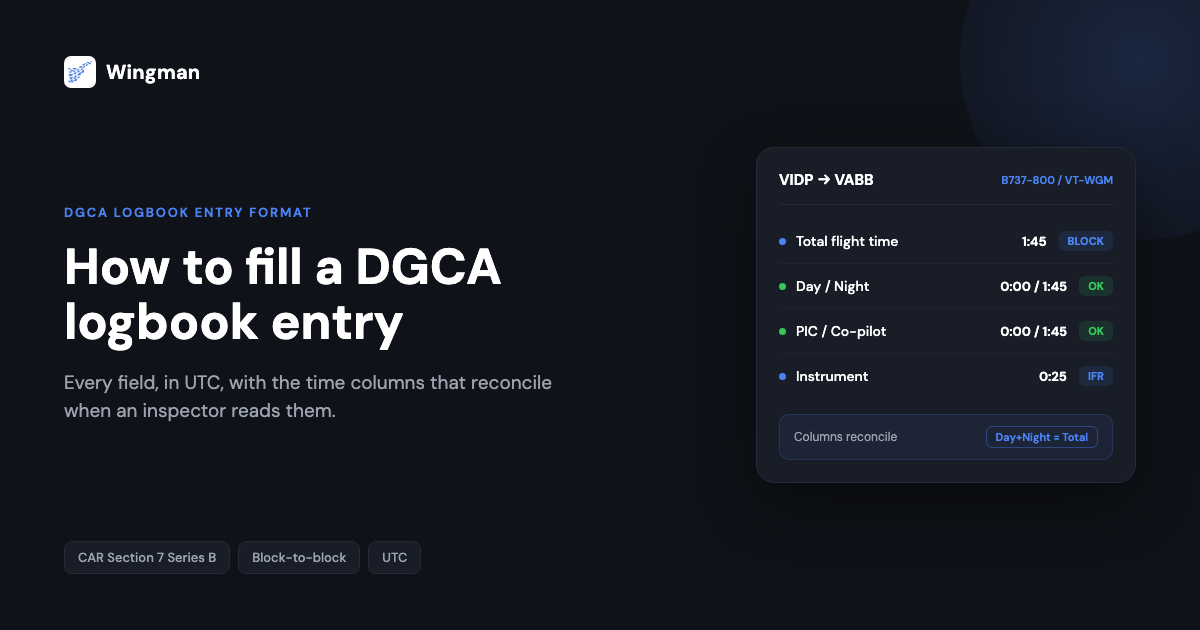
Here is one sector logged from start to finish. The data is fictional and the registration is illustrative, chosen so nothing maps to a real aircraft or crew. The sector is an evening VIDP to VABB departure flown as co-pilot, with the whole block period falling in night.
| Field | Entry |
|---|---|
| Date (UTC) | 14 Mar |
| Aircraft type | B737-800 |
| Registration | VT-WGM (illustrative) |
| From | VIDP |
| To | VABB |
| Block off (UTC) | 1600 |
| Block on (UTC) | 1745 |
| Total flight time | 1:45 |
| Day | 0:00 |
| Night | 1:45 |
| PIC | 0:00 |
| Co-pilot | 1:45 |
| Dual | 0:00 |
| Instrument | 0:25 |
| Remarks | Night sector. ILS RWY 27 VABB. |
Read it the way an auditor would. The block period is 1600 to 1745 UTC, which is one hour forty-five minutes, so the total reads 1:45. The whole block period sits after 30 minutes past sunset, so day is 0:00 and night is 1:45, and day plus night equals the total. The pilot flew as co-pilot for the sector, so PIC is 0:00 and co-pilot is 1:45, and PIC plus co-pilot equals the total. Instrument time of 0:25 records the portion flown on instruments, and the remarks name the approach. Every cross-check closes. That reconciliation, repeated cleanly across many entries, is what an inspector is looking for.
The five errors auditors notice most
None of these are exotic. They are the patterns that come up when an inspector reads a logbook closely, and each one signals something specific.
- Disaggregated time that does not reconcile. When PIC plus co-pilot does not equal total, or day plus night does not equal total, the entry contradicts itself. An auditor reads this as a record kept without cross-checking, which invites a closer look at every other entry.
- Local time instead of UTC. A block off written in IST against a UTC date produces an entry that cannot be reconciled with rosters or movement data. It also tends to corrupt the day and night split, because the night window is defined in relation to local sunset but the times around it are meant to be logged in UTC.
- Airborne time logged as flight time. DGCA flight time is block to block. Logging wheels-up to wheels-down understates flight time on every sector and, more tellingly, produces totals that do not match an operator’s block records.
- Aircraft type without registration. An entry that names the type but omits the airframe is incomplete on its face. Both are required, every entry.
- Corrections that break the paper rules. On a paper logbook, correction fluid or an un-initialled overwrite undermines the integrity of the entry. The fix is the boring one: a single line through the error and an initial, or no overwriting at all. [VERIFY]
The common thread is consistency. An auditor is rarely chasing a single wrong number. They are checking whether the record was kept to a standard, and the entries that reconcile cleanly are the ones that close a review quickly. If your eGCA-facing paperwork is in scope as well, the same discipline carries over to common CA-39 form errors and to uploading your logbook to eGCA.
Special cases: simulator, instrument, and repositioning
Simulator sessions. Simulator time is logged separately from aircraft time, and the entry must specify the type of simulator used, FNPT, FFS, or FTD, along with the approved ATO or operator under which the session was conducted. [VERIFY] A session logged without the device type and the approving body is missing information an auditor expects to see.
Instrument approaches and instrument time. Instrument time, actual or simulated, goes in the instrument column and reconciles within the sector total. Approaches flown are worth recording in the remarks field, since that is where the context for instrument currency lives and where an auditor looks when the instrument number prompts a question.
Repositioning flights. The distinction that matters is whether you were an operating crew member or travelling. Time during which you operate the sector as required crew is flight time and is logged as such. Travelling as a passenger to position for duty is not flight time, and is recorded separately according to your operator’s procedure rather than in the flight time columns. When the role on a sector is unusual, the remarks field is where you make it unambiguous.
Paper logbook versus digital logbook
Format compliance is the same target for both. The difference is where errors get caught. A paper logbook relies on you to do the arithmetic, hold the UTC discipline, and keep corrections clean, and it surfaces mistakes only when someone reads it, often the inspector. A digital logbook can enforce the format at the point of entry instead of the point of inspection.
| Aspect | Paper logbook | Digital logbook |
|---|---|---|
| Reconciliation | Manual; errors surface on review | Columns reconcile as you enter |
| Time zone | You convert and hold UTC discipline | UTC handled and stored consistently |
| Corrections | Ink only, no fluid, overwrites initialled | Edits tracked, no fluid problem |
| Day / night split | Calculated by hand | Computed from times and sector |
| Production on demand | Physical book must be present | Exported in the required format on request |
| Backup | A single physical copy | Synced across devices |
For pilots flying with Indian carriers, the practical gain from digital logging is transcription accuracy. Wingman imports rosters from the systems Indian operators run, including AIMS eCrew, so the date, sector, and block times arrive without manual copying, which removes the most common source of the reconciliation errors above. Wingman keeps the same logbook on iOS, Android, and Web, and exports a DGCA-compliant logbook you can produce on demand.
Where Wingman fits
Wingman builds DGCA format into every entry, with the disaggregated time columns, UTC handling, and reconciliation handled at the point of entry rather than left to you to verify afterwards. It is used by 30,000+ pilots across 400+ airlines, and although it is a global product rather than an India-only tool, it produces regulator-compliant exports for DGCA alongside the FAA, EASA, UK CAA, GCAA, GACA, NZCAA, HKCAD, CASA, and CAAS. The free tier covers up to 250 logged hours, and full access is ₹4,499 per year in India.
You can read the full DGCA logbook guide or see the Wingman pilot logbook in detail. If a check or interview is coming up, it is also worth preparing your logbook for an airline interview ahead of time. You can start free in the Wingman app and log your next sector correctly from the first field.
Frequently asked questions
What fields are mandatory in a DGCA pilot logbook entry?
A compliant entry records the date in UTC, aircraft type and registration, departure and destination, block off and block on times, total flight time block to block, the day and night split, and disaggregated PIC, co-pilot, dual, and instrument time, with remarks for context. Total flight time on its own is not sufficient; the capacity columns must be present and must reconcile to the total.
How do I fill a DGCA pilot logbook entry step by step?
Work in order: date in UTC, aircraft type and registration, from and to, block off and block on in UTC, total flight time as block on minus block off, the day and night split, then the capacity columns for PIC, co-pilot, or dual, then instrument time for the IFR portion, and finally remarks. Before you sign the entry, check that day plus night equals the total and the capacity columns equal the total.
Can I use a digital logbook for DGCA compliance?
Yes. What DGCA requires is the correct format and the ability to produce the logbook on demand during an inspection or audit. A digital logbook that records the required fields in the required format, in UTC, with the time columns reconciling, meets that requirement and can be exported when an inspector asks for it. [VERIFY]
What is the correct way to log a simulator session in a DGCA logbook?
Log simulator time separately from aircraft time and specify the device type, FNPT, FFS, or FTD, together with the approved ATO or operator under which the session was conducted. A simulator entry without the device type and the approving body is incomplete. [VERIFY]
What happens if DGCA finds errors in my logbook during an audit?
Errors typically generate queries, and because auditors read for consistency across entries, one unreconciled entry can prompt a wider review of your records. The way to avoid that is preventive: keep the time columns reconciling, hold UTC discipline, record type and registration on every entry, and keep corrections clean on paper logs.
← All articles