Existing operator registration on eGCA: a step-by-step guide
eGCA is the e-Governance of Civil Aviation platform run by the Directorate General of Civil Aviation (DGCA) in India. It is the single portal through which operators, pilots, and other aviation organisations interact with DGCA online, from licensing to compliance to the electronic logbook. If your organisation is an already approved DGCA operator, you do not create a brand-new account from scratch. Instead you complete what eGCA calls existing operator registration, which connects your established DGCA approval to a portal login.
This guide explains what existing operator registration on eGCA means, why it matters, and how to work through the eGCA login and setup steps in the right order. The steps are written so you can follow them with the portal open in another tab. We have corrected the navigation flow from older versions of this guide, including the duplicated step numbering that used to appear, so the sequence reads cleanly from first login to logbook verification.
What existing operator registration on eGCA means
Organisations already approved and registered with DGCA, such as Scheduled, Non-Scheduled, and General Aviation operators, are given access to the eGCA portal so their existing approval can be managed digitally. Because these operators already hold a DGCA record, the registration is not about proving eligibility again. It is about activating a portal identity for an organisation DGCA already recognises.
In practice this means DGCA issues the operator an eGCA ID and a default password, sent by email to the operator’s Accountable Manager. That first login is the moment the existing approval becomes a live, usable account inside eGCA. From there the operator can reach the services that different DGCA directorates publish through the platform.
Why operators register on eGCA
Registration is the gateway to the services DGCA delivers through eGCA. Once an operator is set up, the portal becomes the place where the organisation manages its people and its compliance tasks rather than relying on paper or email exchanges. Two things matter most for day-to-day flying operations.
First, the operator can create and manage sub-users, delegating specific responsibilities to named people inside the organisation. Second, and important for any operator that employs pilots, the portal handles eLog Book verification, where an authorised person approves the flight time pilots record. Both of these depend on the operator account being registered and set up correctly, which is why getting the login flow right early saves time later.
Before you start: who logs in first
The Accountable Manager is the first person to log in. DGCA sends the eGCA ID and default password to the Accountable Manager’s registered email, so confirm that mailbox is current before you begin. If the credentials have not arrived, check the account DGCA holds on record for your organisation rather than attempting to register as a new operator, because existing operators are provisioned by DGCA rather than self-registered. [VERIFY]
It also helps to know in advance which sub-user roles you intend to create, because the Accountable Manager sets these up after the first login. Common roles include eLog Book Verifier, Director of Flight Operations, and Document Verifier. Deciding who fills each role before you start means you can complete the setup in one sitting. [VERIFY]
How to complete eGCA operator login and setup
Follow these steps with your operator credentials ready. The first three steps cover the Accountable Manager login and account setup, and the remaining steps cover delegating access to sub-users.
-
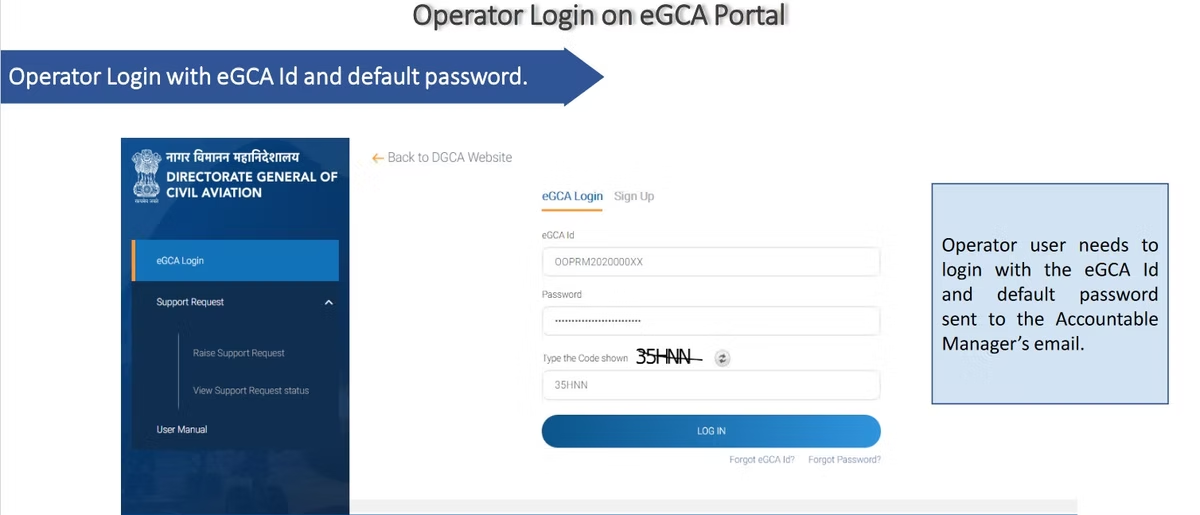
Log in as the Accountable Manager. Go to the eGCA portal at https://egca.dgca.gov.in and sign in using the eGCA ID and default password DGCA sent by email. This first login activates the operator account. [VERIFY]
-
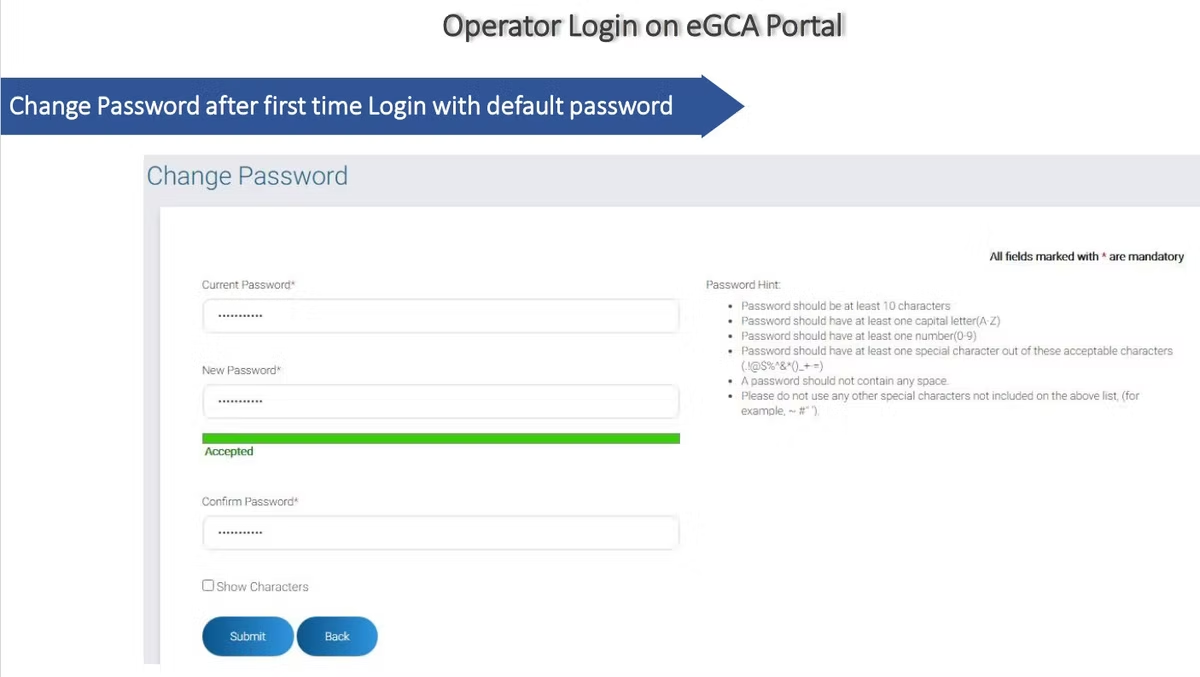
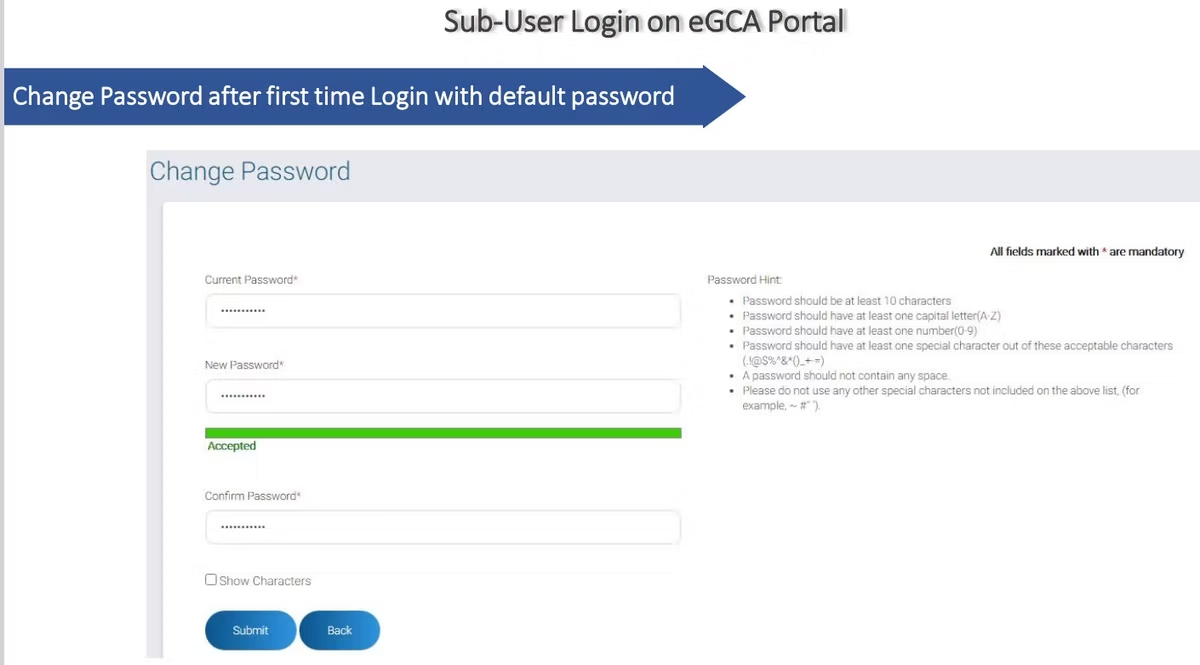
Change the default password. On first login you are prompted to replace the default password with one of your own. Do this immediately, because the default credentials were sent over email and should not remain in use. A strong, unique password protects the operator record and everything linked to it.
-
Reach the operator homepage. After the password change you are taken to the operator homepage, which is the control centre for the services available to your organisation. From here you manage users and access the directorate services published on the portal.
-
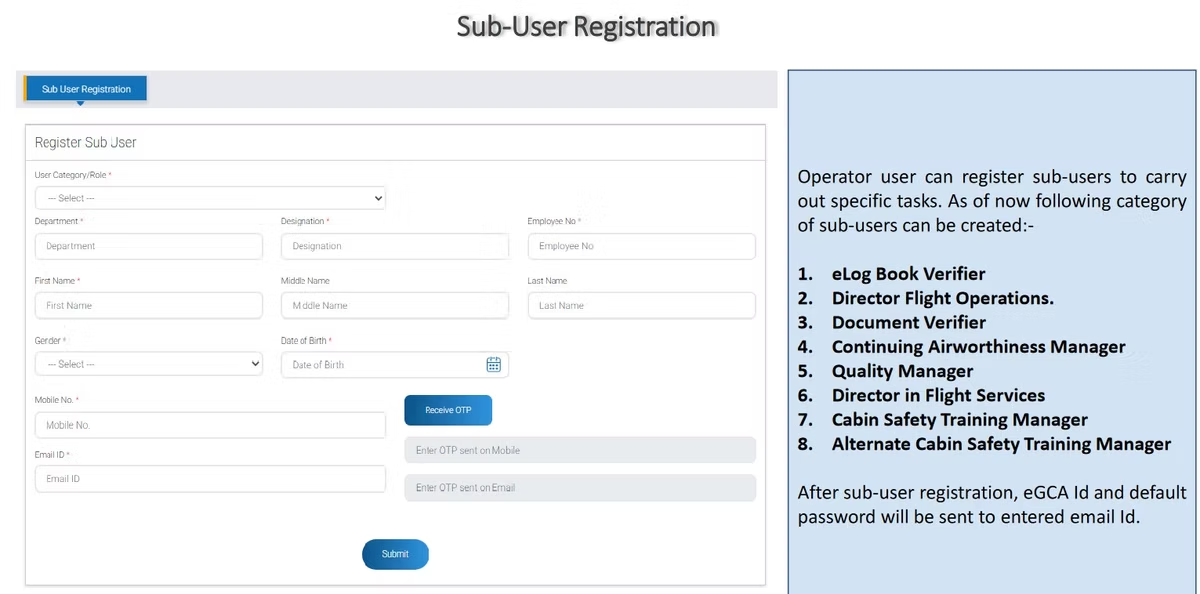
Create sub-users. As the Accountable Manager, open the user management area and create sub-users for the roles your organisation needs, such as eLog Book Verifier, Director of Flight Operations, or Document Verifier. Each sub-user is issued an eGCA ID and a default password, delivered to that person by email. [VERIFY]
-
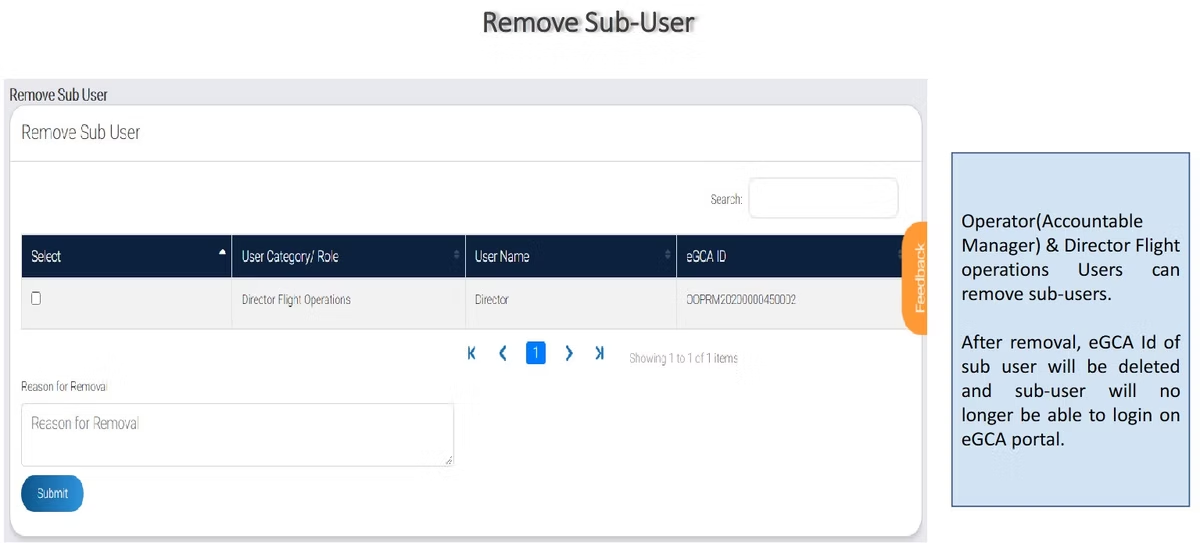
Remove sub-users when needed. The Accountable Manager and the Director of Flight Operations can remove a sub-user whose access is no longer required. Removing a sub-user deactivates that person’s login, which keeps the operator’s access list accurate as people change roles or leave. [VERIFY]
Once these steps are complete, the operator account is registered, secured, and staffed with the right people for the tasks ahead.
eGCA operator registration flow

Sub-user login and the eLog Book verification flow
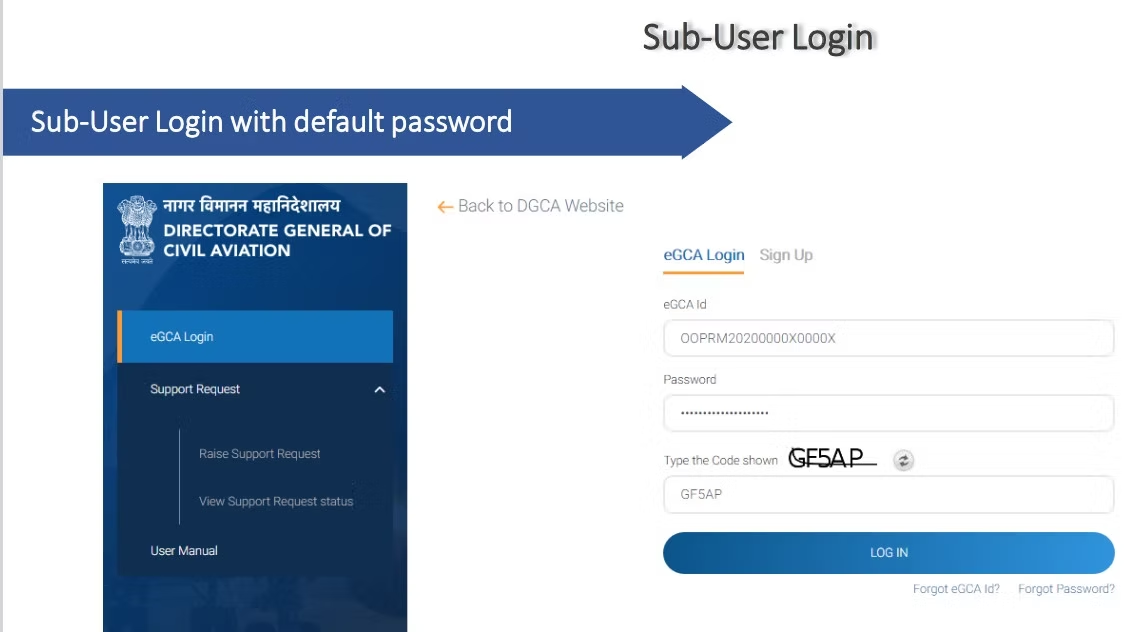
Sub-users follow the same first-login pattern as the operator. They sign in with the eGCA ID and default password sent to them, then change the password on first use. Once a sub-user with the eLog Book Verifier role is set up, they can carry out the logbook approval work that the operator account exists to support.
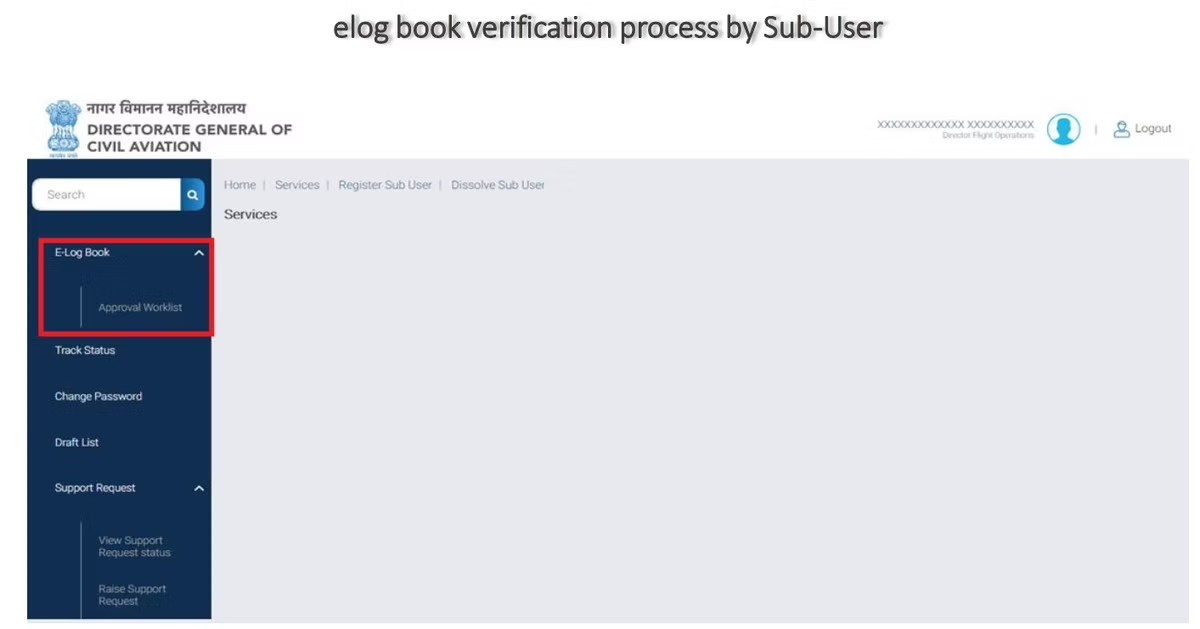
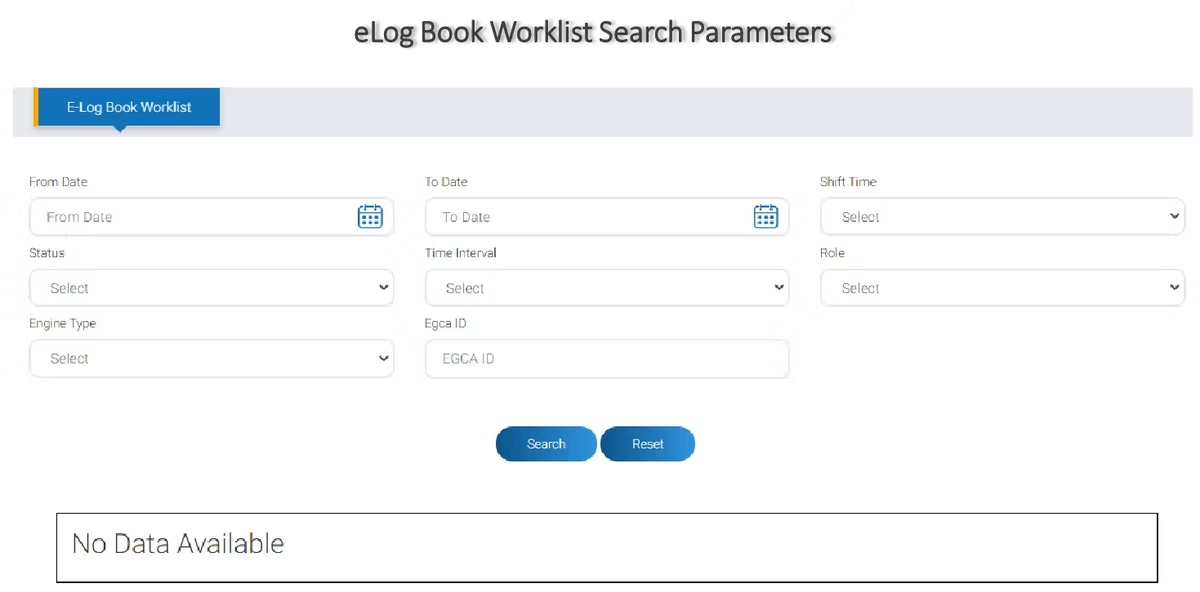
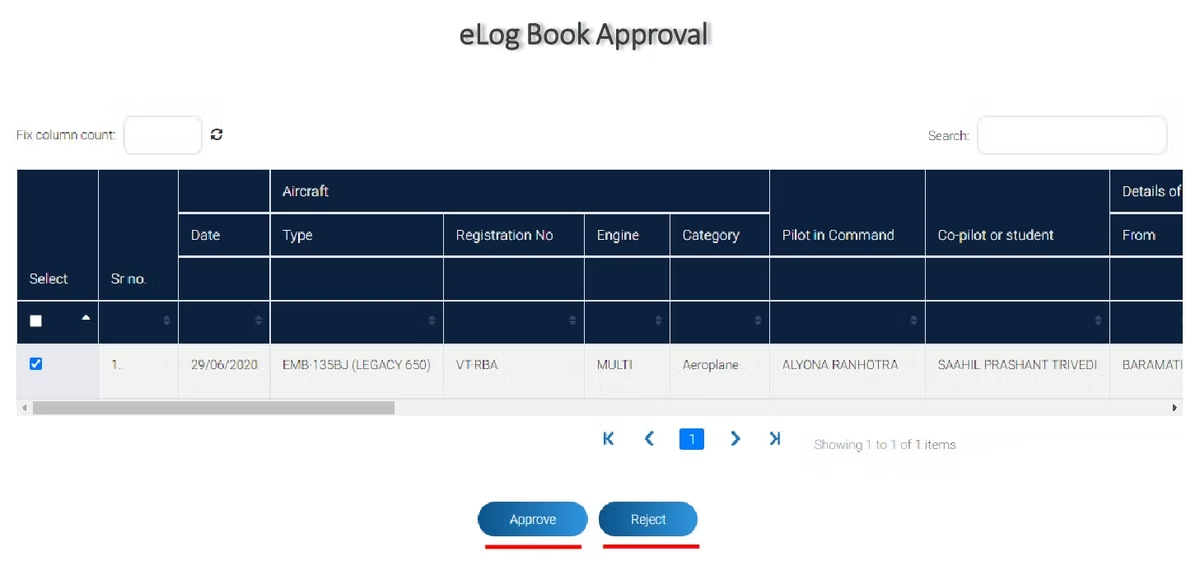
The verification process runs through an approval worklist. The verifier opens the eLog Book section and reaches the worklist of entries awaiting a decision. They can search the worklist using the available parameters to locate the specific entries they need, then approve or reject each one. Approving an entry confirms the recorded flight time for a pilot, while rejecting one sends it back rather than accepting it. This is how an operator keeps its pilots’ DGCA logbook records accurate and current inside eGCA. [VERIFY]
For pilots, the practical takeaway is that the hours you submit are reviewed by a named person at your operator before they are accepted. That makes accurate, well-organised records on your side worth the effort, because a clean submission is faster to verify.
eGCA login: keeping access working
A few habits keep eGCA login problems to a minimum. Use the official portal address, https://egca.dgca.gov.in, rather than a saved link of uncertain origin. Change default passwords on first use for every account, operator and sub-user alike. Keep the Accountable Manager’s email current with DGCA, since that mailbox receives the credentials and account notifications. And keep your sub-user list tidy by removing access promptly when someone changes role, so the people who can act on the operator’s behalf always match the people who should.
If a login does not work, confirm you are using the most recent credentials and the correct portal address before assuming an account problem. For sub-users, check that the Accountable Manager has actually created the account, because a sub-user cannot log in until the operator has set them up.
Where pilots fit in: logging the hours that get verified
eGCA verification only works well when the underlying flight records are accurate, and that responsibility starts with each pilot. Keeping a clean, up-to-date logbook means the hours you send for verification are right the first time. This is where a dedicated digital logbook helps. Wingman is a pilot logbook used by 30,000+ pilots across 400+ airlines, and it keeps your hours, currency, and licence details in one place across iOS, Android, and Web.
Wingman is a global product rather than an India-only tool, and it supports DGCA among regulators including the FAA, EASA, UK CAA, GCAA, GACA, NZCAA, HKCAD, CASA, and CAAS. It can import rosters automatically from systems such as AIMS eCrew, NavBlue RAIDO, CAE Crew Access, ARMS, CESAR, Sabre, FLICA, and PDC CrewConnex, which keeps your flight records consistent with what your operator already holds. For India specifically, there is a focused walkthrough on keeping a DGCA pilot logbook in India. There is a free tier up to 250 logged hours, so you can start before committing anything up front, and you can open it directly at app.wingmanlog.com.
How eGCA fits the wider DGCA journey
Operator registration is one part of how organisations and pilots use eGCA. Individual pilots also register on the platform for their own licensing and logbook activity. If you are setting up your personal access, our guides on how to get your eGCA ID and the wider pilot registration process with eGCA explain what to expect. Understanding how the operator side and the pilot side relate to each other helps everyone keep their records straight as flight time is logged, submitted, and verified.
Frequently asked questions
What is existing operator registration on eGCA?
It is the process by which an organisation already approved by DGCA, such as a Scheduled, Non-Scheduled, or General Aviation operator, activates access to the eGCA portal. DGCA issues an eGCA ID and default password to the operator’s Accountable Manager, who logs in to set up the account. The operator is not registering as new, but connecting an existing DGCA approval to a portal login.
How does the Accountable Manager log in to eGCA for the first time?
The Accountable Manager receives an eGCA ID and default password by email from DGCA. They go to https://egca.dgca.gov.in, sign in with those credentials, and are prompted to change the default password immediately. After that they reach the operator homepage where they can manage users and services. [VERIFY]
What are sub-users and who can create them?
Sub-users are people inside the operator’s organisation given specific roles, such as eLog Book Verifier, Director of Flight Operations, or Document Verifier. The Accountable Manager creates them after first login, and each sub-user receives their own eGCA ID and default password by email. The Accountable Manager and the Director of Flight Operations can also remove a sub-user when their access is no longer needed. [VERIFY]
How does eLog Book verification work on eGCA?
A sub-user with the eLog Book Verifier role opens the eLog Book section and reaches the approval worklist. They search the worklist for the relevant entries, then approve or reject each one. Approving confirms the recorded flight time for a pilot, which keeps DGCA logbook records accurate inside eGCA. [VERIFY]
Is eGCA the same as Pariksha?
No. eGCA is the DGCA platform used for licensing, operator services, and the electronic logbook, while Pariksha is the separate DGCA portal used for flight crew examinations. Operators complete registration and logbook verification on eGCA, not on Pariksha.
← All articles