How to apply for a Class 2 medical assessment on eGCA
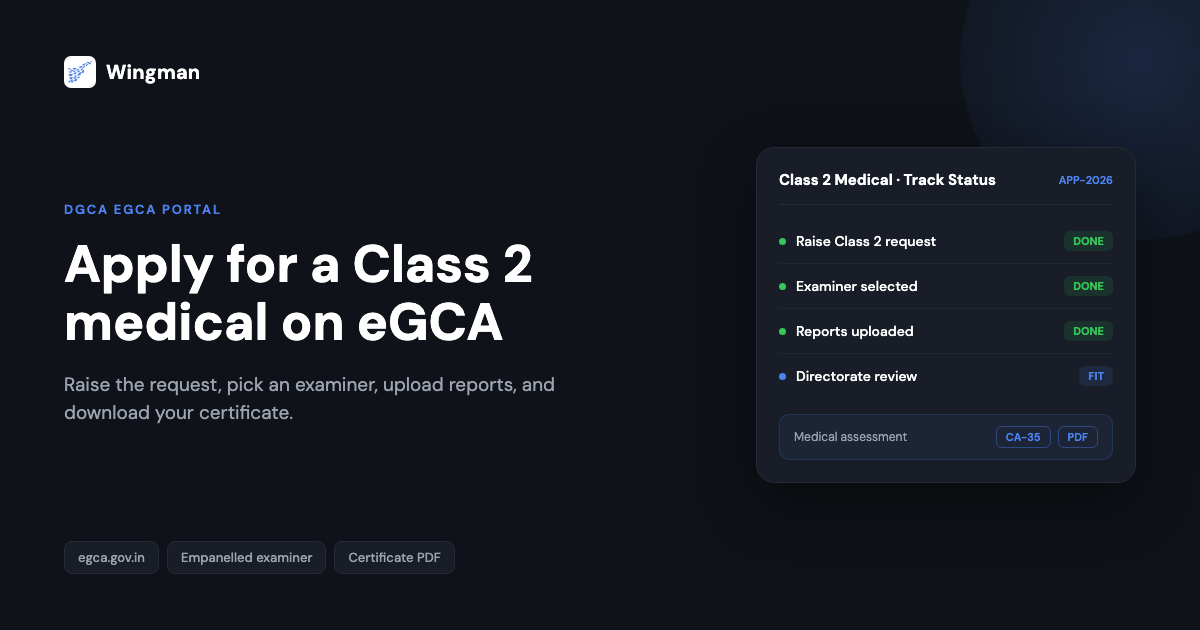
A Class 2 medical assessment is one of the first regulatory steps on the path to a pilot licence in India. It confirms you meet the basic medical standards the Directorate General of Civil Aviation (DGCA) sets for student pilots and several other licence categories, and it is normally required before you can hold a valid Class 1 assessment. The whole process now runs through eGCA, the DGCA online platform at https://egca.gov.in, so you raise the request, pick an examiner, upload reports, and download your certificate in one place.
This guide explains who needs a Class 2 medical, what the prerequisites are, and then walks through the application on eGCA as a numbered how-to you can follow with the portal open in another tab. It also covers the investigations you are likely to be asked for, how fees and validity work in broad terms, and what happens after the examiner submits your file.
Who needs a Class 2 medical and why it matters
The Class 2 medical assessment is the medical standard tied to entry-level flying activity, including the student pilot stage of training. A current Class 2 certificate is one of the things you need in place before your Class 1 assessment, which is the standard required for commercial flying. Because the assessment has to be renewed on a recurring basis rather than issued once, you will come back to this same eGCA process more than once across your flying career.
If you are weighing up the difference between the two medical classes, our companion guide on the Class 2 medical application covers the requirements and standards side, while this page focuses on the step-by-step eGCA application itself. Reading both together gives you the full picture: what is being assessed, and exactly where to click.
Prerequisites before you apply
A few things need to be in place before you raise a Class 2 request on eGCA. Sorting these out first avoids a stalled application later.
- Recurring requirement. A medical assessment is not a one-time event. All candidates need a current medical clearance, and the certificate carries a defined validity period after which you reapply. [VERIFY]
- eGCA registration. You must be registered on the DGCA portal with a valid eGCA user ID before you can raise a medical request. If you have not done this yet, see how to get your eGCA ID and the wider pilot registration process with eGCA.
- Age range. Applicants are expected to fall within the eligible age range that DGCA applies to the relevant licence category. [VERIFY]
- Class 2 before Class 1. A valid Class 2 assessment is normally a precondition for applying for a Class 1 assessment, so the Class 2 step usually comes first. [VERIFY]
If your next step after this is the higher standard, our walkthrough on how to apply for a Class 1 medical renewal on eGCA follows the same portal logic.
How to apply for a Class 2 medical assessment on eGCA
Once your eGCA account is active and you have your login ready, the application runs through the following steps.
-
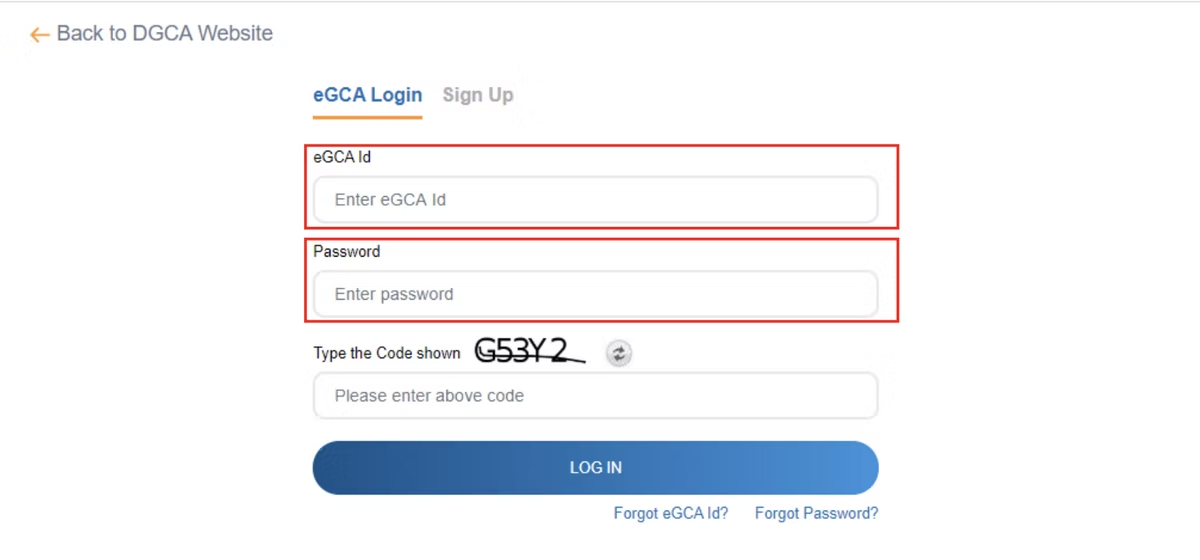
Log in to eGCA. Go to the eGCA portal at https://egca.gov.in and sign in. If you are new to the system, complete registration first using your computer number and PMR details, or sign up as a new pilot, so a unique eGCA ID is generated and sent to you by email or SMS. [VERIFY]
-
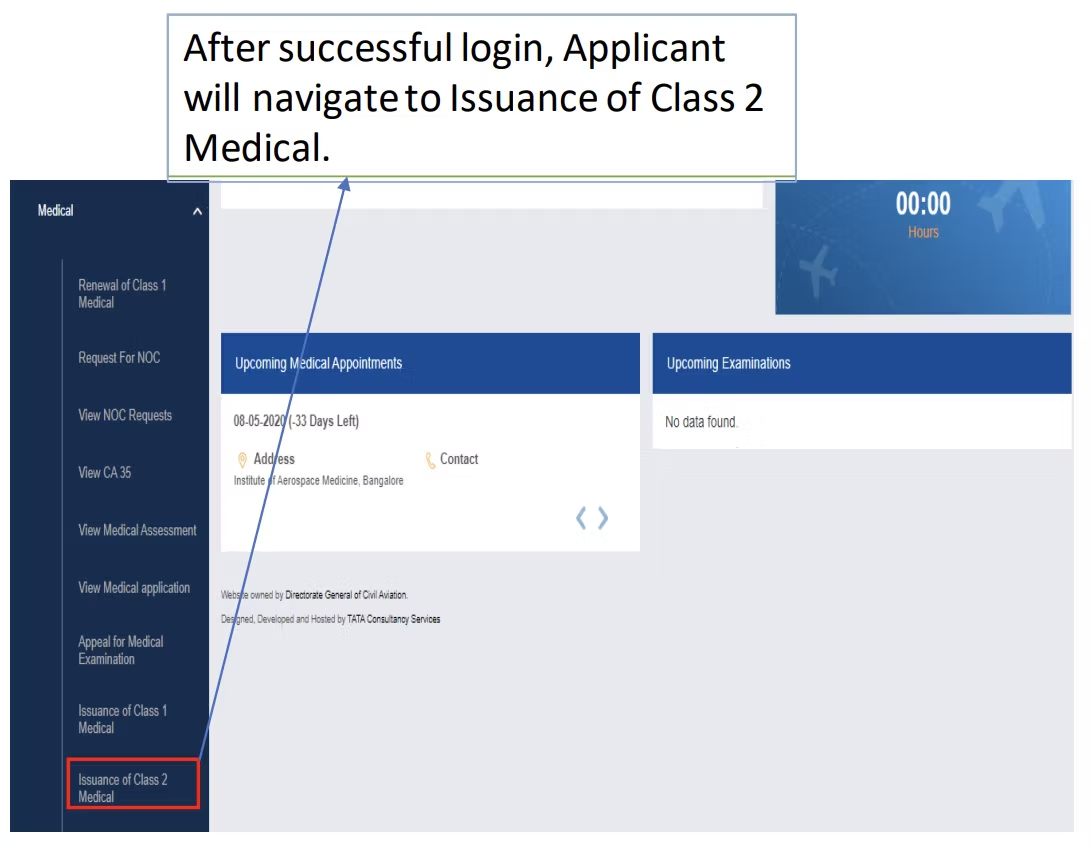
Raise a medical assessment request. From your dashboard, open the medical services area and create a new request for a Class 2 medical assessment. Make sure you select Class 2 specifically rather than another class. [VERIFY]
-
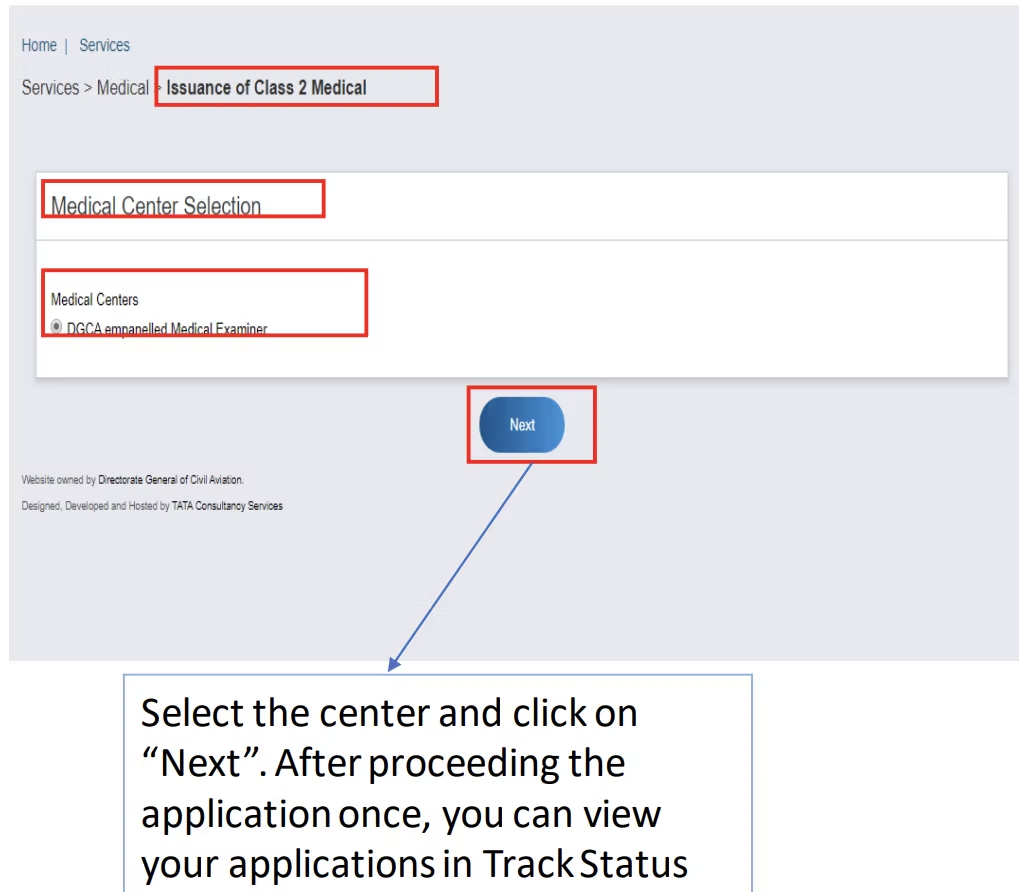
Select a DGCA empanelled examiner. Choose an authorised Examiner for Medical from the list in the portal. Only empanelled examiners can conduct your assessment and submit the result, so pick one you can reach for the in-person checkup. [VERIFY]
-
Complete the application e-form. Fill in your basic details and personal details accurately, and make sure the form matches the nature of your request. Submit the form online along with a recent photograph and a clear medical declaration. Errors here are a common reason files get sent back, so check each field before submitting.
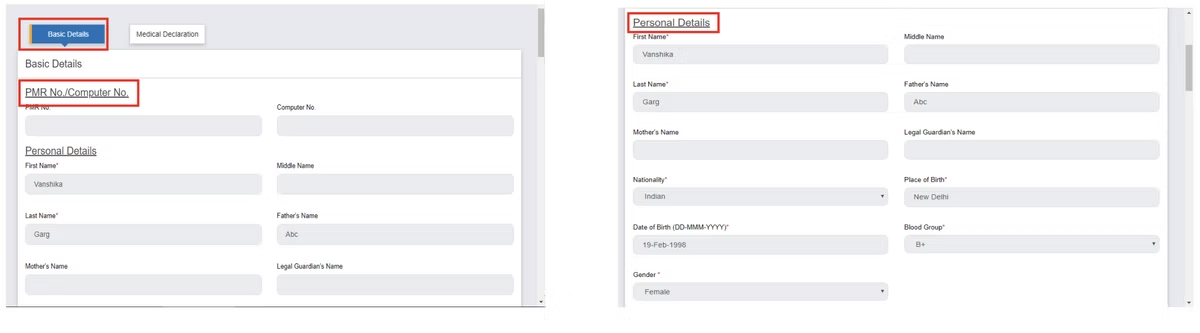
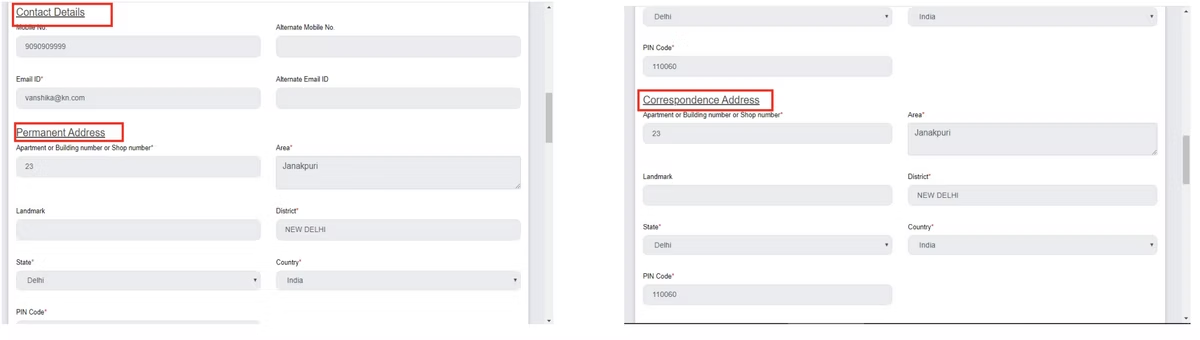
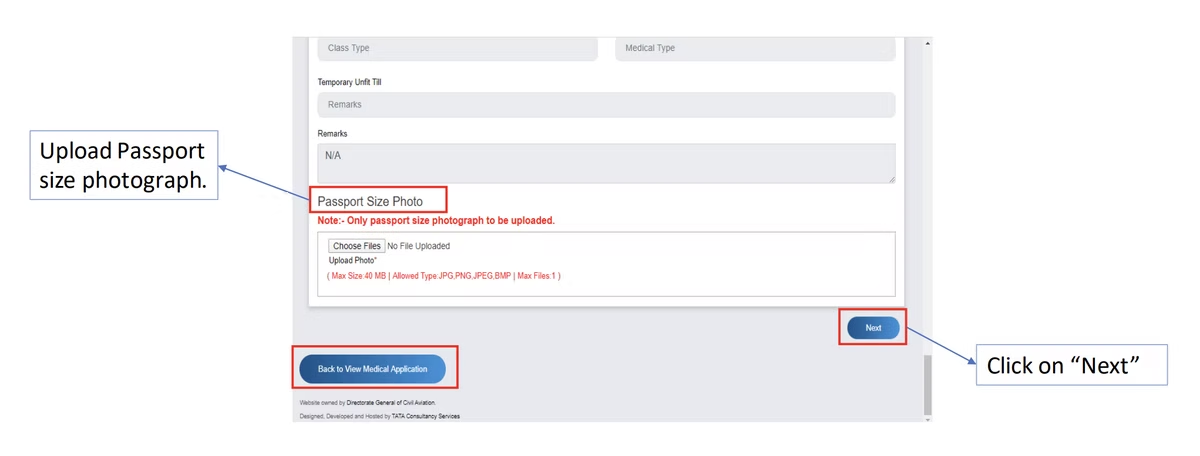
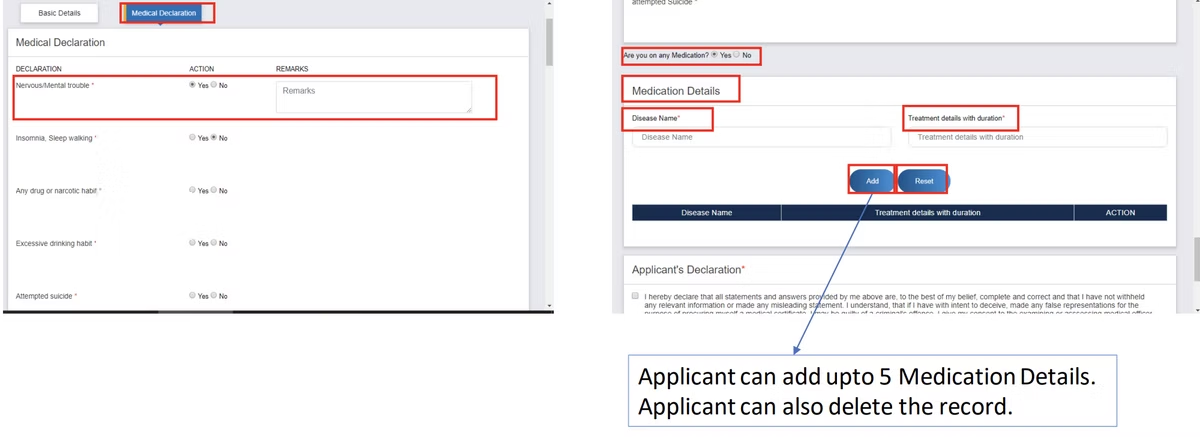
-
Note your application ID. On successful submission, eGCA generates an application ID automatically and sends you an email and SMS. The email typically lists the blood tests and investigations you need to complete before your examination. [VERIFY]
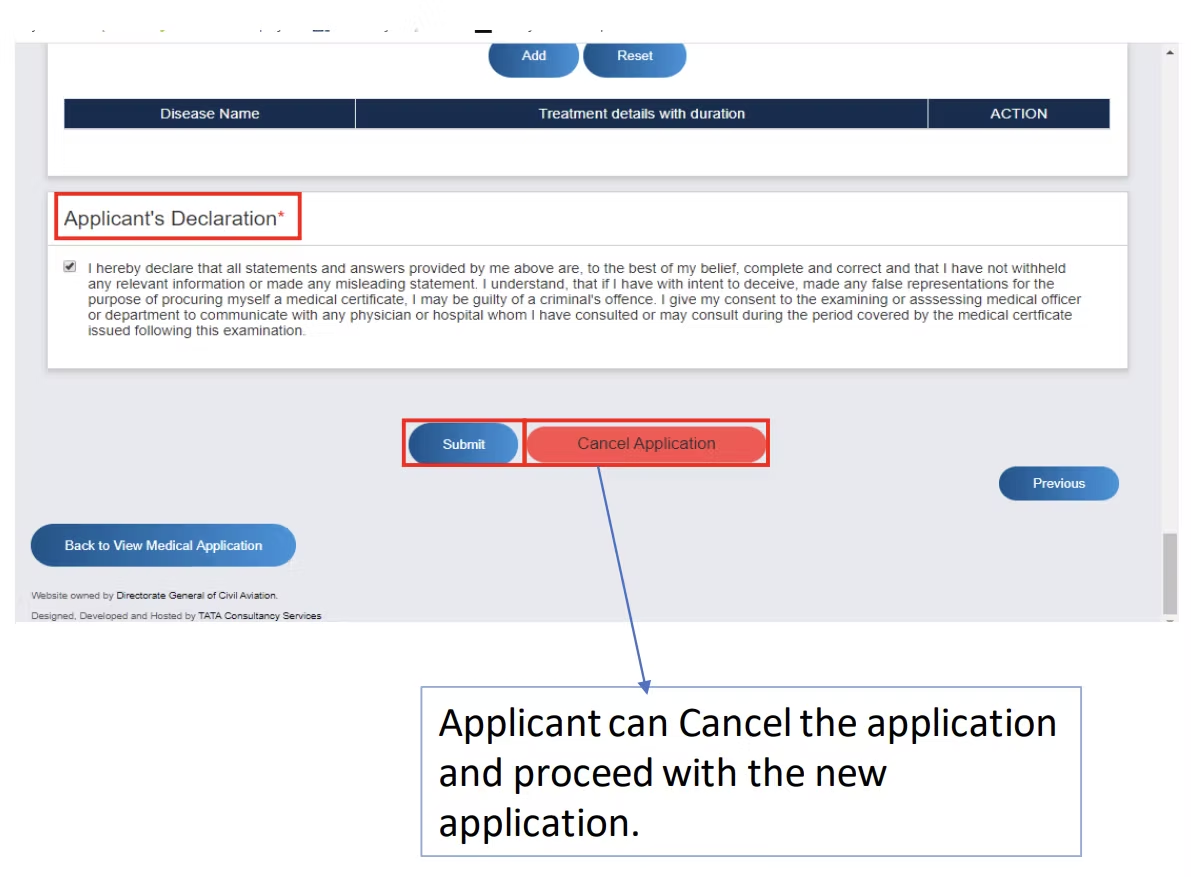
-
Complete and upload your investigation reports. Get the required tests done, then return to the portal, open Track Status, and upload all the investigation reports before your scheduled examination. Having these ready in advance keeps the examiner appointment on schedule. [VERIFY]
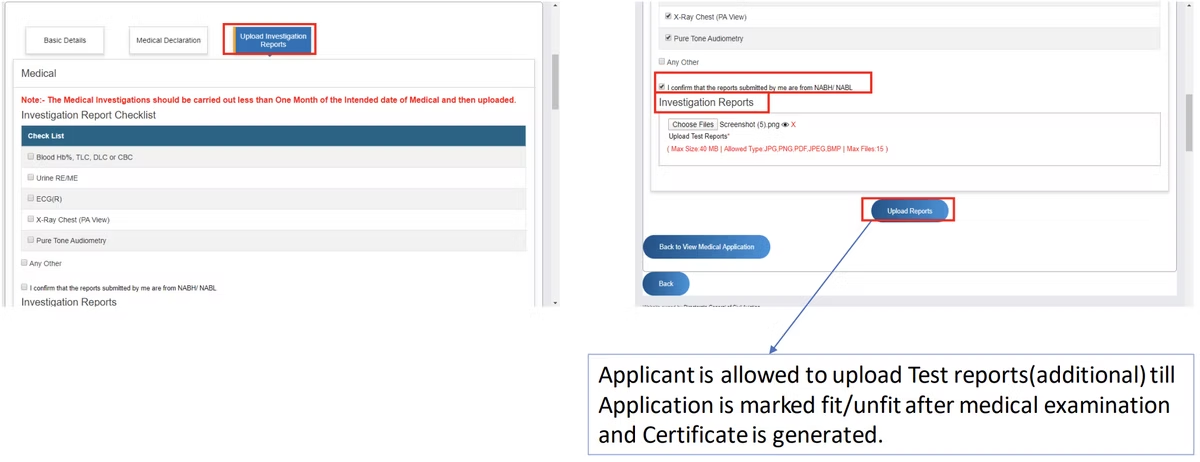
-
Visit the examiner for your checkup. On the appointed day, attend the DGCA empanelled examiner in person. From Track Status, re-validate your application form in the examiner’s presence, and bring a hard copy of the ID proof you uploaded at registration so it can be verified. [VERIFY]
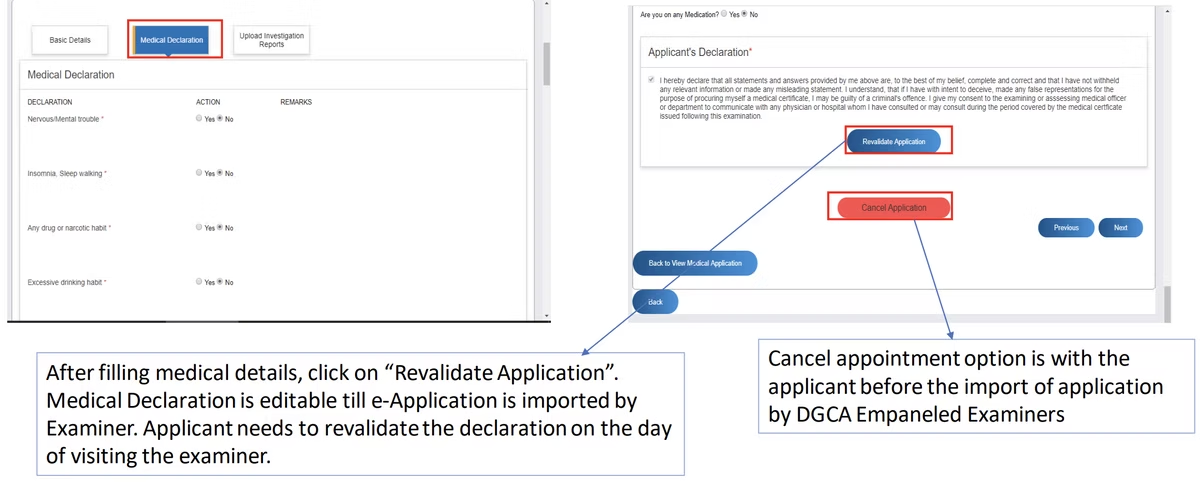
-
Examiner’s assessment and certificate. The examiner conducts the medical examination. If you meet the standards, a medical certificate is issued and made available to download on eGCA, usually under Services then Search then View Medical Assessment. [VERIFY]
-
Medical Directorate review. Your application then reaches the Medical Directorate, where the reviewing authority assesses your fitness status and categorises you as fit, temporarily unfit, or permanently unfit. [VERIFY]
-
Notification and download. If you are found fit, the assessment is conveyed through eGCA and email. If you are found unfit, an unfitness letter is communicated the same way. Either document can be downloaded as a PDF from the portal using your applicant login under Services then Search then View Medical Assessment. [VERIFY]
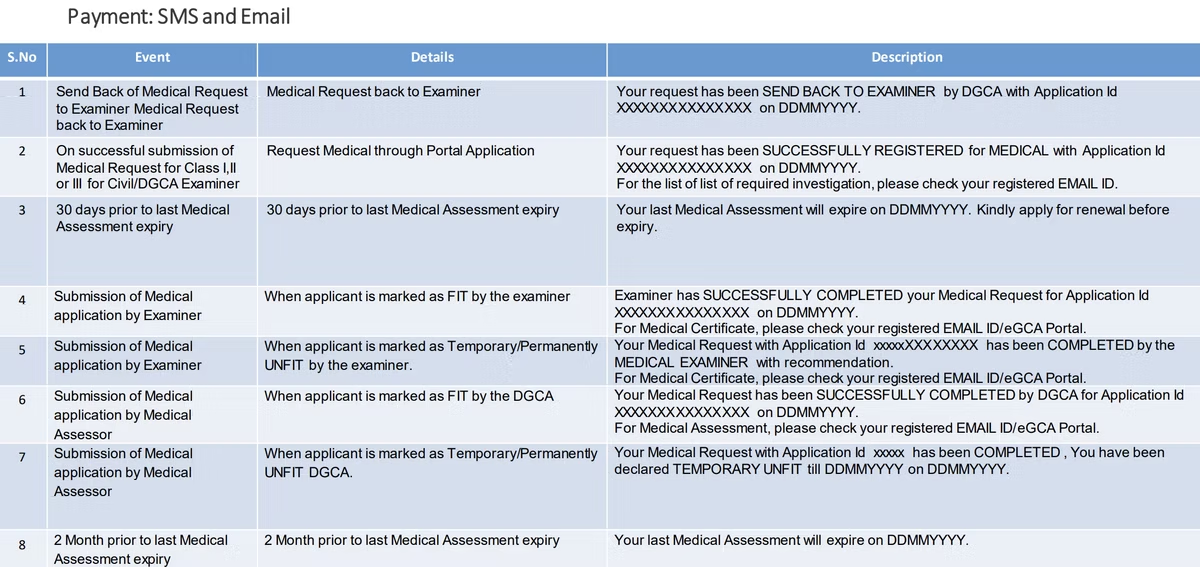
The Class 2 application flow at a glance

Investigations, fees, and validity
The investigation list is generated for your specific application and arrives with your application ID, so always work from the list eGCA emails you rather than a generic checklist. For a first Class 2 assessment, candidates are commonly asked for routine blood work and basic screening, with the exact panel set by DGCA medical requirements for your category and age. [VERIFY]
Fees are paid as part of the process, and the examiner’s professional charges for the in-person examination are separate from any portal fee. Amounts vary, so confirm the current figures on eGCA and with your chosen examiner before you book. [VERIFY]
Validity depends on the licence category and your age band. A Class 2 certificate is issued for a defined period and then needs to be renewed through the same eGCA flow, so it is worth noting the expiry date on your certificate and starting the next application before it lapses. [VERIFY] If your eventual goal is commercial flying, plan the Class 1 step around your Class 2 validity so the two stay aligned.
After your assessment: keep your records in order
A medical certificate is one of several documents you need to keep current as a pilot, alongside your licence, ratings, and a clean record of your flight time. Once you start flying, those hours need to be logged accurately and kept ready for licence and renewal applications. This is where a digital logbook earns its place. Wingman is a pilot logbook used by 30,000+ pilots across 400+ airlines, and it keeps your hours, currency, licence details, and document expiry reminders in one place across iOS, Android, and Web.
Wingman is a global product rather than an India-only tool, and it supports DGCA among regulators including the FAA, EASA, UK CAA, GCAA, GACA, NZCAA, HKCAD, CASA, and CAAS. For the Indian process specifically, there is a focused walkthrough on keeping a DGCA pilot logbook in India. There is a free tier up to 250 logged hours, so you can start recording while you are still a student pilot, and you can create an account without committing anything up front. Tracking your medical expiry alongside your hours means your Class 2 renewal does not catch you by surprise.
How Class 2 fits the wider eGCA journey
The Class 2 medical is one piece of the licensing path that runs through eGCA. Depending on where you are headed, you will use the same portal for licence applications, ratings, and renewals. If you need background on the DGCA medical system as a whole, see the instructions for medical services in eGCA. Knowing how the medical step connects to the rest of your eGCA record helps you keep everything consistent as you progress from student pilot toward a commercial licence.
Frequently asked questions
What is a Class 2 medical assessment on eGCA?
It is the DGCA entry-level medical standard, applied for and managed through the eGCA portal at https://egca.gov.in. It confirms you meet the basic medical requirements for student pilot and related categories, and it is normally needed before a Class 1 assessment. [VERIFY]
Do I need an eGCA ID before applying?
Yes. You must be registered on eGCA with a valid user ID before you can raise a medical request. If you do not have one yet, see our guides on getting your eGCA ID and the eGCA registration process.
How do I know which blood tests and investigations to do?
When your application ID is generated, eGCA sends an email listing the investigations required for your specific application. Complete those tests and upload the reports through Track Status before your examiner appointment. Always work from the list eGCA sends rather than a generic one. [VERIFY]
What is the difference between Class 2 and Class 1?
Class 2 is the entry-level standard tied to student pilot and similar categories, while Class 1 is the higher standard required for commercial flying. A valid Class 2 is normally a precondition for a Class 1 assessment. Our Class 2 medical application guide covers the requirements, and the Class 1 medical renewal on eGCA guide covers the next step. [VERIFY]
Where do I download my certificate once I am found fit?
After the Medical Directorate review, log in to eGCA and go to Services, then Search, then View Medical Assessment to download your certificate or, if applicable, your unfitness letter as a PDF. [VERIFY]
← All articles