eGCA login: official link, OTP steps, forgot password and eGCA ID
The official eGCA login page is https://www.dgca.gov.in/digigov-portal/jsp/dgca/common/login.jsp, inside the DGCA digital services site. That is the address to bookmark: the old standalone domain, egca.dgca.gov.in, has been retired and no longer opens, even though many older guides still link to it. To log in you need your eGCA ID, your password, and the captcha code shown on screen, followed by a one-time password (OTP) sent to your registered mobile and email.
This guide covers the whole login side of eGCA: the login steps including the OTP check that became mandatory in July 2025, what to do when you have forgotten your password or your eGCA ID, fixes for the common login problems, and how to reach the eGCA helpdesk. If you are new to the portal, the registration walkthrough further down shows how to get your eGCA ID in the first place.
How to log in to eGCA
-
Open the official login page at https://www.dgca.gov.in/digigov-portal/jsp/dgca/common/login.jsp. If a bookmark or guide sends you to egca.dgca.gov.in and the page does not load, that is expected: the old domain has been withdrawn, and only the dgca.gov.in address works.
-
Stay on the eGCA Login tab. The same card has a Sign Up tab for new users, covered later in this guide.
-
Enter your eGCA ID in the first field. This is the username you received by email when your registration was approved.
-
Enter your password and type the captcha code shown, then select LOG IN.
-
Validate the OTP. Since 28 July 2025, eGCA uses multi-factor authentication: after the password step, an OTP is sent to your registered mobile number and email, and you are logged in only after you confirm it. Keep the registered phone and inbox within reach whenever you plan to log in, and use the resend option if the code takes long to arrive.
eGCA login and recovery flow
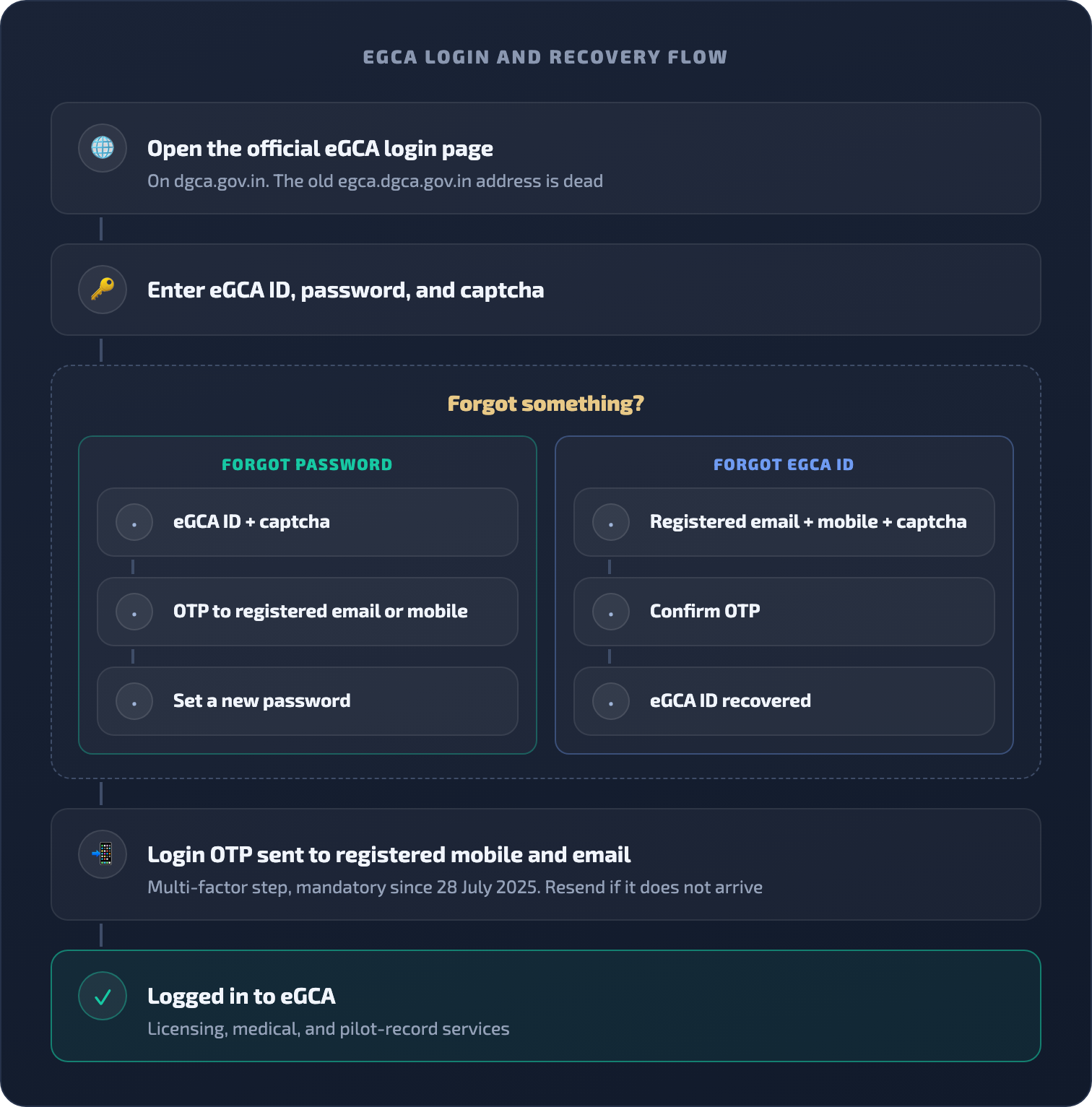
Forgot your eGCA password
The reset flow is self-service and takes a few minutes as long as you can access your registered mobile number or email.
-
On the login page, select Forgot Password?/Get Password.
-
Enter your eGCA ID and the captcha code.
-
Choose where the OTP should go: your registered email address or your registered mobile number.
-
Select Receive OTP, then enter the 6-digit code. A resend option is available if it does not arrive.
-
Set your new password and confirm it.
The portal enforces specific password rules: at least 10 characters, at least one capital letter, at least one number, at least one special character from the set listed on the reset screen (such as @, $, %, or _), no spaces anywhere, and the new password cannot be the same as any of your last three passwords. Choosing a password that meets all of these on the first attempt saves a frustrating loop of rejections.
Forgot your eGCA ID
Forgetting the ID itself is just as common as forgetting the password, and the portal has a separate self-service flow for it.
-
On the login page, select Forgot eGCA Id?.
-
Enter your registered email address and your 10-digit mobile number, then the captcha code.
-
Submit and confirm the OTP sent to your registered contact details.
Your eGCA ID is then shared with you without any helpdesk involvement. The flow depends on the email and mobile number registered to your account, so if you have lost access to both, contact the helpdesk instead. One clarification while you are on that screen: the Get eGCA ID link on the login card is for drone users only, not for pilots, so ignore it for flight crew accounts.
eGCA login not working: quick fixes
-
The page does not open at all. Check which address you are using. The retired egca.dgca.gov.in domain fails outright, while the dgca.gov.in login page above is the live one. DGCA also takes the portal down for maintenance from time to time, usually with an on-screen banner, and access typically resumes the same evening.
-
The OTP does not arrive. Use the resend option first, then confirm you still control the mobile number and email registered on your account. OTPs go only to those registered contacts, so a changed number is the usual culprit. If the registered contacts are out of date, the helpdesk has to update them.
-
Invalid credentials. The eGCA ID and password are both case-sensitive, and the captcha must match exactly. If you cannot get in after a couple of careful attempts, run the forgot-password flow rather than guessing, since repeated failures can lock the account and add a support call to your day.
-
You are on the wrong portal. DGCA written exams live on Pariksha, a separate system with separate credentials. If your exam login does not work on eGCA, that is why. Our guide on how to check exam results on the DGCA Pariksha website covers that side.
eGCA helpdesk contacts
When self-service does not resolve it, these are the official support channels, and they work even when you cannot log in:
- Phone: 1800-11-3422 (toll-free eGCA support cell)
- Email: egcasupport@dgca.nic.in
- Online: raise a support request on the portal without logging in, and track it from the same screen later.
Phone and email are the reliable routes for account lockouts, registered-contact changes, and anything OTP-related.
New to eGCA: how to register and get your eGCA ID
If you do not have an account yet, registration is what creates your eGCA ID. A note before you start: the portal currently states that new pilot registrations are open for applicants seeking issue or conversion of a CPL and for Class 1 medical renewals through DGCA-empanelled medical examiners, so the flow below is aimed at those groups.
Registration goes more smoothly if you gather a few things first, because the portal asks for them in sequence and times out if you stall.
- A working mobile number and email address. Both are validated by OTP during registration, and they become the registered contacts that later receive your login OTPs, so use ones you will keep.
- An identity document such as Aadhaar, passport, voter ID, or driving licence, plus a scan or photo of it.
- Your photograph and signature, prepared to the portal’s on-screen file rules.
- Your PMR (Previous Medical Records) file number, if you already have one. Freshers will not have a PMR yet, and that is fine.
Then follow these steps with the portal open:
-
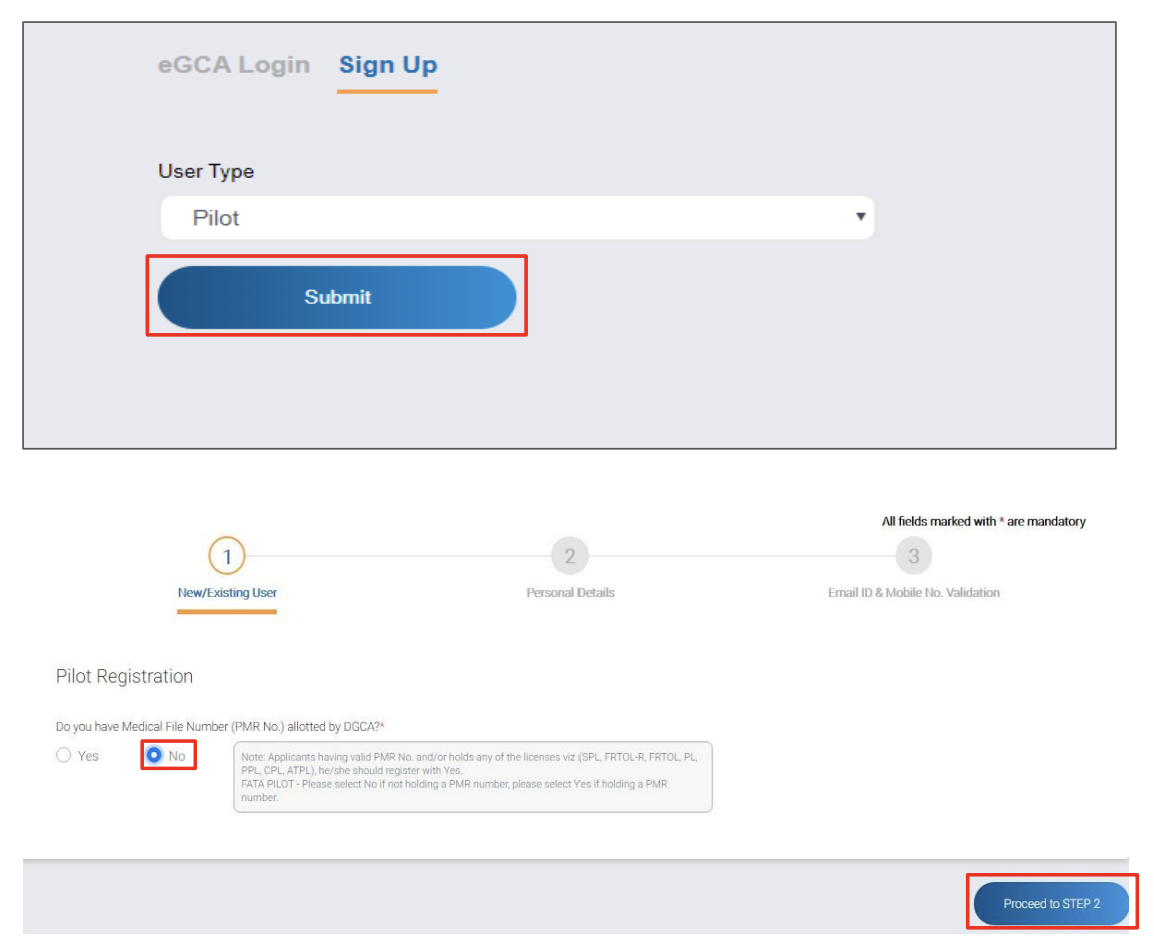
Open the eGCA login page and switch to the Sign Up tab.
-
Choose Pilot as the user type from the drop-down menu, then continue to the registration form.
-
Answer the PMR question. If you are a fresher without a PMR file number, choose NO and move on. If you have one, choose YES and enter its details.
-
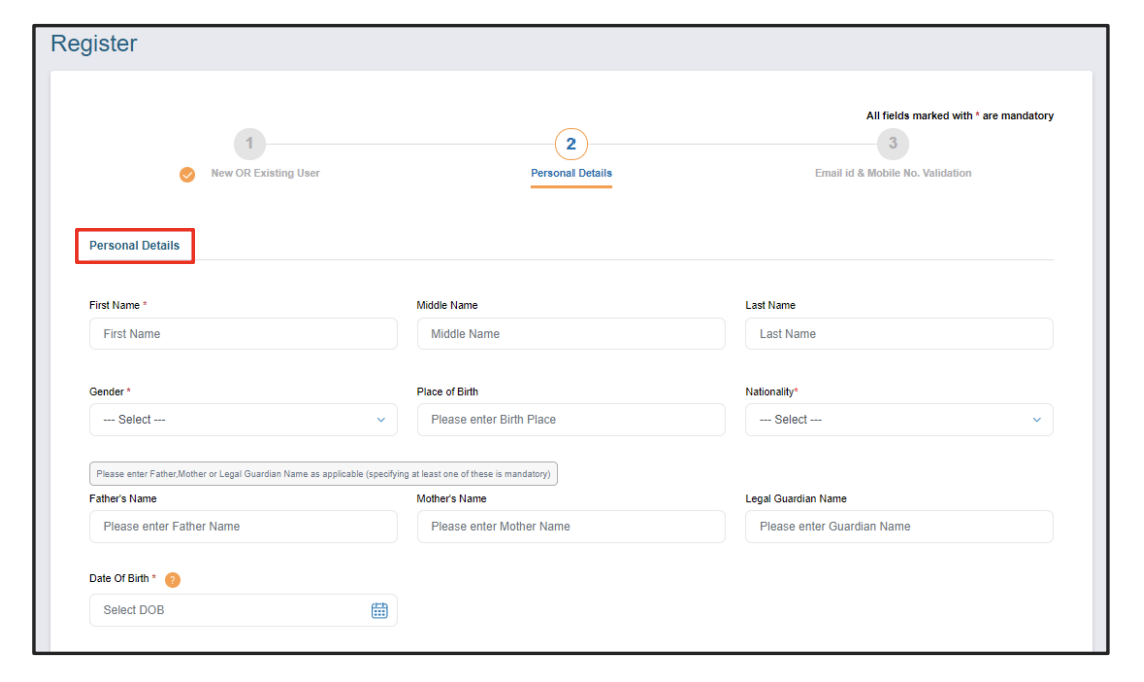
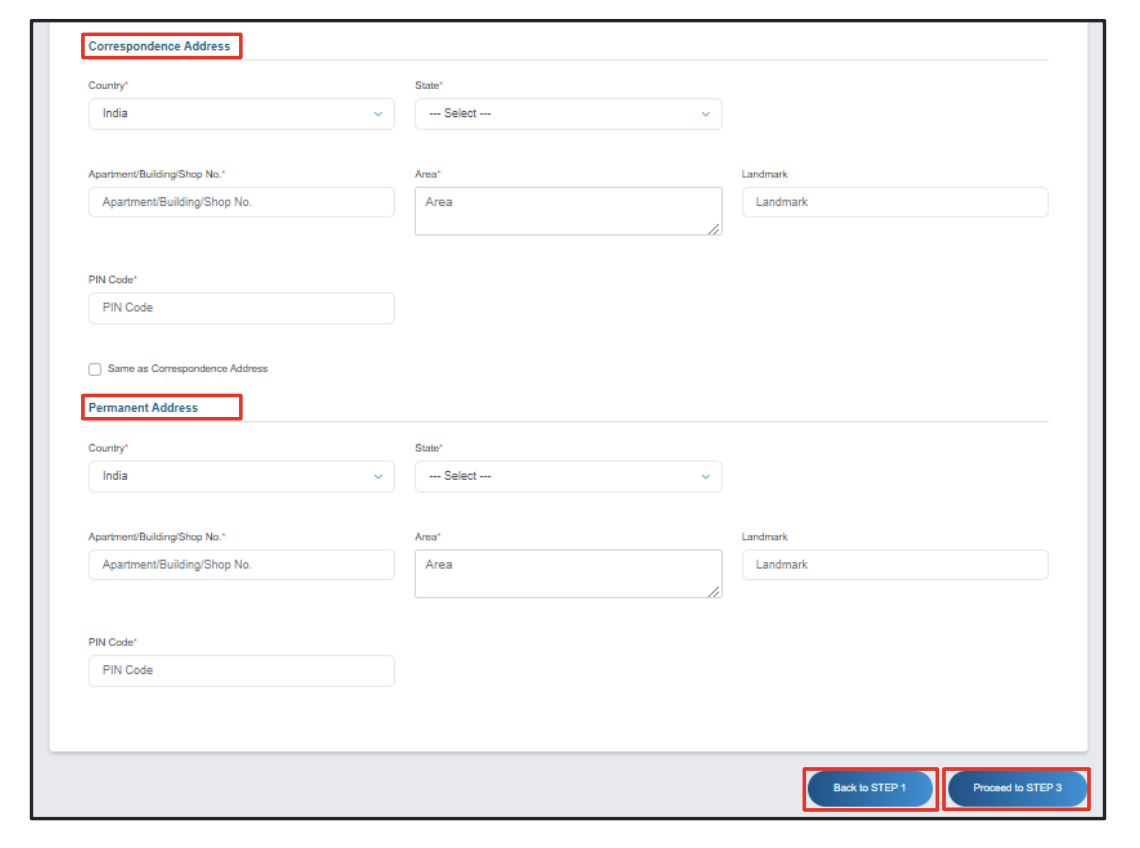
Enter your personal information. Make sure every field matches your identity proof exactly, because mismatches cause rejections later.
-
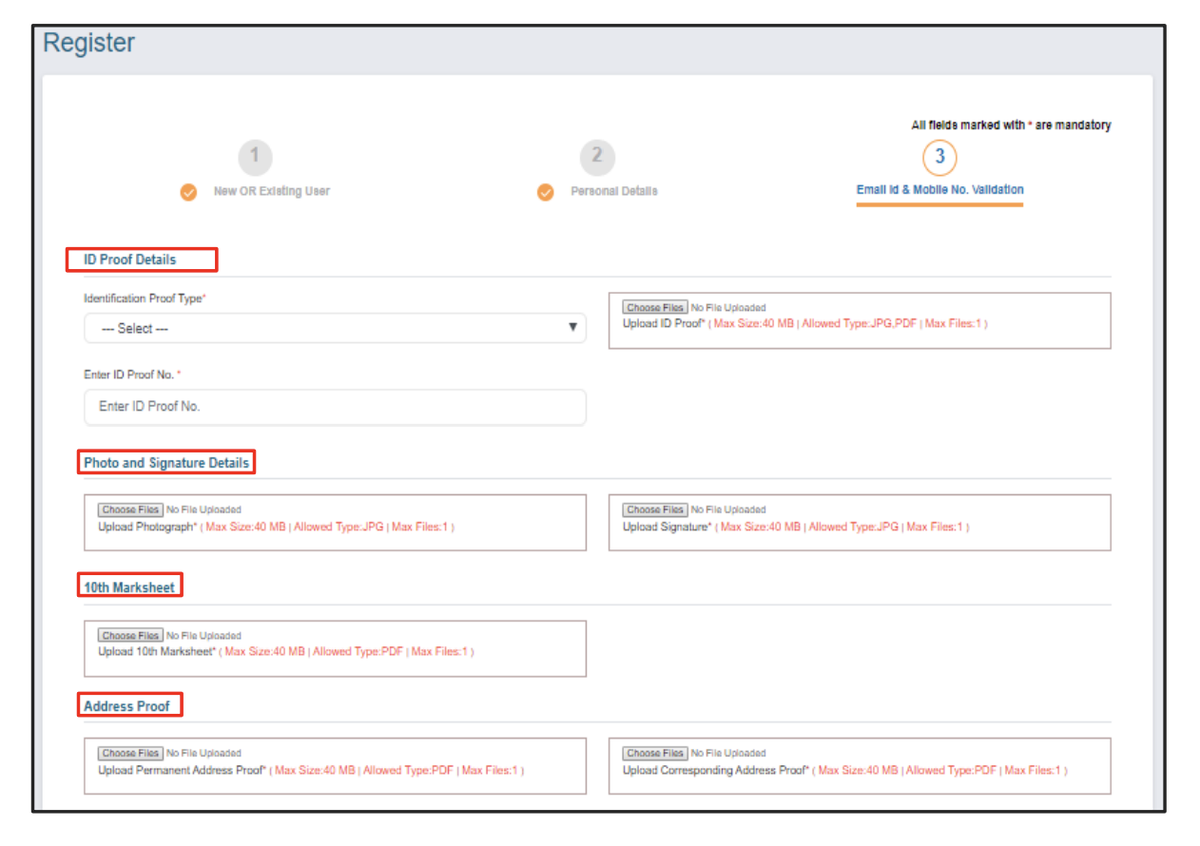
Upload your identity document in JPG or PDF format, within the size limit shown on the upload screen. Keeping scans small and legible avoids the most common upload rejection.
-
Add your photograph and signature, following the on-screen guidelines on dimensions and background before uploading.
-
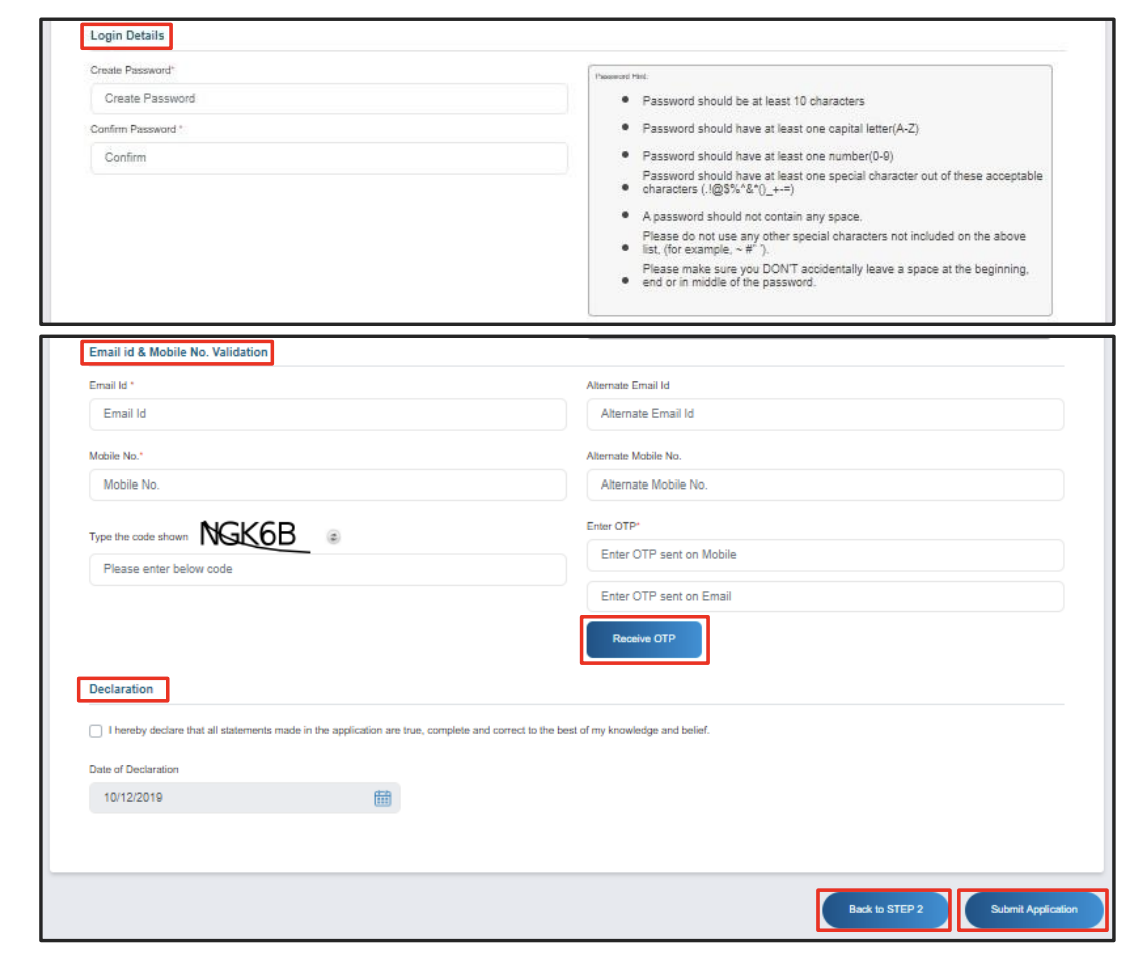
Enter and verify your contact details. The portal sends an OTP to your phone and email, and you confirm both.
-
Submit the application.
-
Collect your eGCA login. Once the application is processed, a confirmation email arrives with your eGCA username and password, and that pair is your eGCA login from then on. If it does not arrive, check spam before assuming something went wrong.
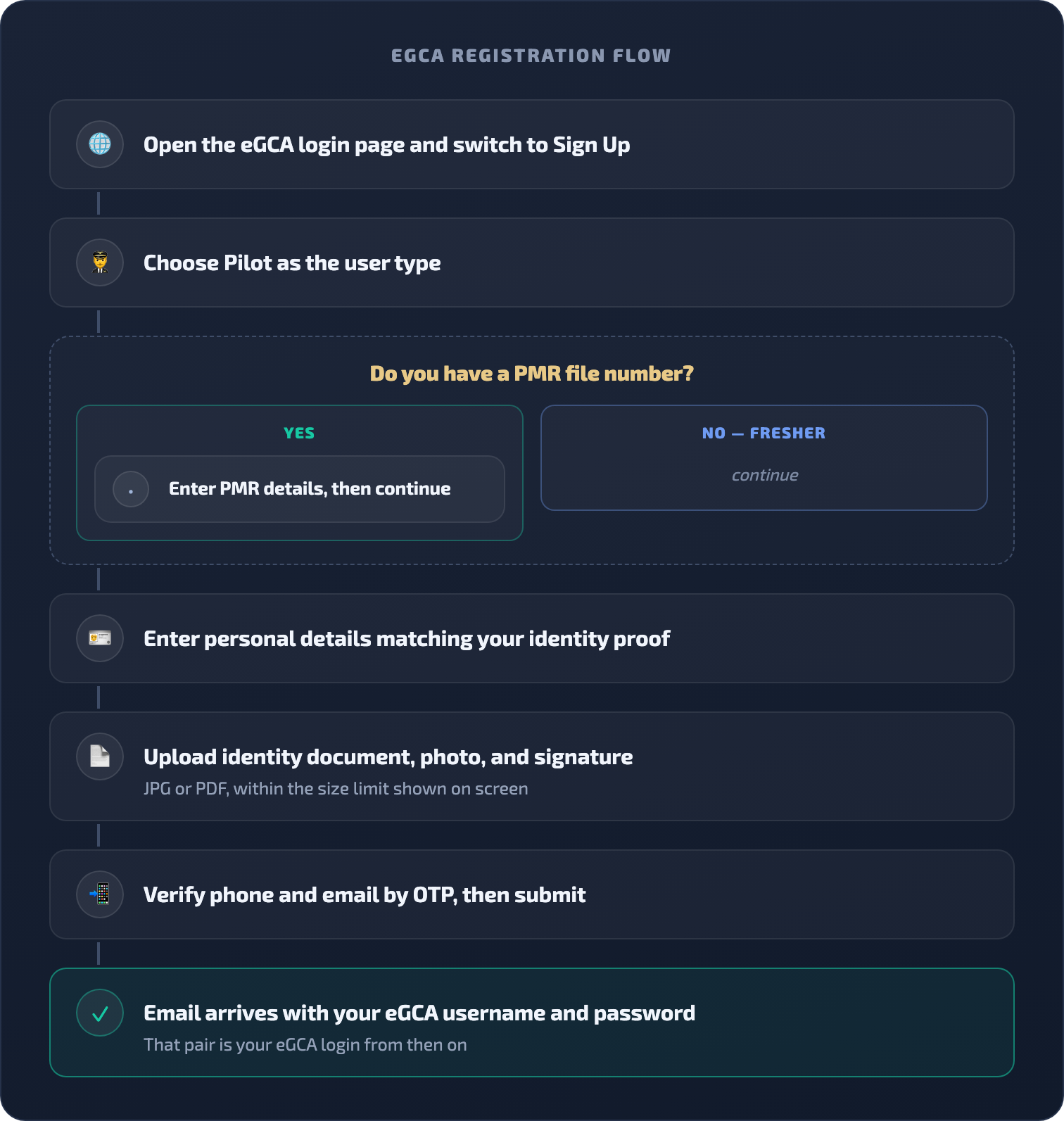
eGCA registration flow
What the eGCA login is for
eGCA stands for electronic Governance of Civil Aviation, the system DGCA uses to deliver pilot, examination, medical, and licensing services online. Your eGCA login is tied to your personal record, so the same credentials follow you from registration through medical entries, licence applications, and renewals across your career. DGCA has continued moving services onto it, including electronic personnel licences for ATPL holders from January 2026, which makes keeping the login healthy worth a few minutes of setup. For the broader registration journey beyond the login, our guide on the pilot registration process with eGCA goes step by step, and there is a dedicated walkthrough for uploading your logbook to eGCA once your account is live.
After you have your eGCA login: keep your hours in order
Getting your eGCA ID is an early administrative step on the path to a licence. The larger, ongoing part of that path is flight time, and every hour you fly needs to be recorded accurately for your licence application and, later, for currency and recency. This is where a digital logbook earns its place alongside your eGCA account.
Wingman is a pilot logbook used by 30,000+ pilots across 400+ airlines, and it keeps your hours, currency, and licence details in one place across iOS, Android, and Web. It is a global product rather than an India-only tool, and it produces regulator-compliant exports for DGCA alongside the FAA, EASA, UK CAA, GCAA, GACA, NZCAA, HKCAD, CASA, and CAAS. For India specifically, there is a focused walkthrough on keeping a DGCA pilot logbook in India.
There is a free tier up to 250 logged hours, so you can start recording flights while you are still training and building toward your licence without committing anything up front. When you are ready, you can create an account and begin logging at app.wingmanlog.com.
Frequently asked questions
What is the official eGCA login link?
The official eGCA login page is https://www.dgca.gov.in/digigov-portal/jsp/dgca/common/login.jsp, inside the DGCA digital services site. The old standalone address egca.dgca.gov.in has been retired and no longer opens, so update any bookmarks that point there.
Why does eGCA ask for an OTP after my password?
Since 28 July 2025, eGCA uses multi-factor authentication. After your eGCA ID, password, and captcha are accepted, an OTP is sent to your registered mobile number and email, and you are logged in only after validating it.
How do I reset my eGCA password?
Use the Forgot Password?/Get Password link on the login page. Enter your eGCA ID and the captcha, choose whether the OTP goes to your registered email or mobile, enter the OTP, then set a new password that meets the portal’s rules: at least 10 characters with a capital letter, a number, and a special character, and not the same as any of your last three passwords.
I forgot my eGCA ID. How do I recover it?
Use the Forgot eGCA Id? link on the login page. Enter your registered email address, your 10-digit mobile number, and the captcha, then confirm the OTP sent to you. As long as you can access the registered email or mobile, your eGCA ID is recovered without contacting the helpdesk.
How do I contact eGCA support?
Call the eGCA support cell toll-free at 1800-11-3422 or email egcasupport@dgca.nic.in. You can also raise and track a support request on the portal without logging in, which helps when the problem is the login itself.
Is eGCA the same as Pariksha?
No. eGCA handles licensing, medical, and pilot-record services, while Pariksha is the separate DGCA portal for flight crew examinations. They are different accounts with different logins, so keep both sets of credentials safe.
← All articles