How to obtain skydiving permission on eGCA
Skydiving operations in India need prior permission from the Directorate General of Civil Aviation (DGCA), and that permission is now applied for online through the eGCA portal. This applies whether you are an aero club running tandem jumps, an adventure-sports operator hosting a drop-zone event, or an organisation arranging a one-off display. If your activity involves dropping people from an aircraft, you need a valid Permission and Extension for Skydiving on record before the operation goes ahead.
This guide explains who needs the permission, what to have ready before you start, and how to apply for it on eGCA step by step. The steps are written so you can follow them with the portal open in another tab, and the closing section covers how to keep your jump and aircraft records straight once approval is in place.
What the skydiving permission on eGCA is for
eGCA is the DGCA online platform for licences, registrations, and operational permissions. The Permission and Extension for Skydiving service is the route through which an operator asks DGCA to authorise skydiving activity, and through which an existing permission is extended when the original validity period is running out. Because the application sits inside eGCA, it is tied to your operator account, so the same login is used to submit, track, and later extend the permission.
The service is aimed at the entity running the operation rather than the individual jumper. In practice that usually means an aero club, an adventure-sports company, or a non-scheduled operator that wants to conduct skydiving from a specified aircraft over a specified period. The application asks for the purpose of the activity and the aircraft involved, so it helps to have those details settled before you begin. [VERIFY]
If you are completely new to the platform and do not yet have a login, set that up first. Our walkthrough on how to get your eGCA ID and the wider pilot registration process with eGCA cover account creation and what to expect from the portal, so your login is ready when you reach the permission steps below.
Before you start: what you need
A small amount of preparation makes the application straightforward. Have the following in place before you open the form:
- eGCA access. You need to be registered on the eGCA portal, or to have received an eGCA ID at your registered email address. The application runs entirely inside your eGCA account.
- A valid email address and mobile number. DGCA sends notifications and one-time passwords to both, so keep them active and accessible during the process.
- Operator details. You apply as an operator type, typically an Aerial Work Operator or a Non-Scheduled Operator, and as either an individual or an organisation. Decide which applies to you before you register. [VERIFY]
- Aircraft and purpose details. The form asks for the aircraft you will use and the purpose of the skydiving activity, so have the relevant registration and operational details ready.
- Supporting documents. Keep your mandatory and supporting documents in a single folder so you can upload them in one pass rather than hunting for files mid-application.
How to apply for skydiving permission on eGCA
Once your account is set up and your documents are ready, the application itself is a sequence of clear steps. Follow them with the portal open.
-
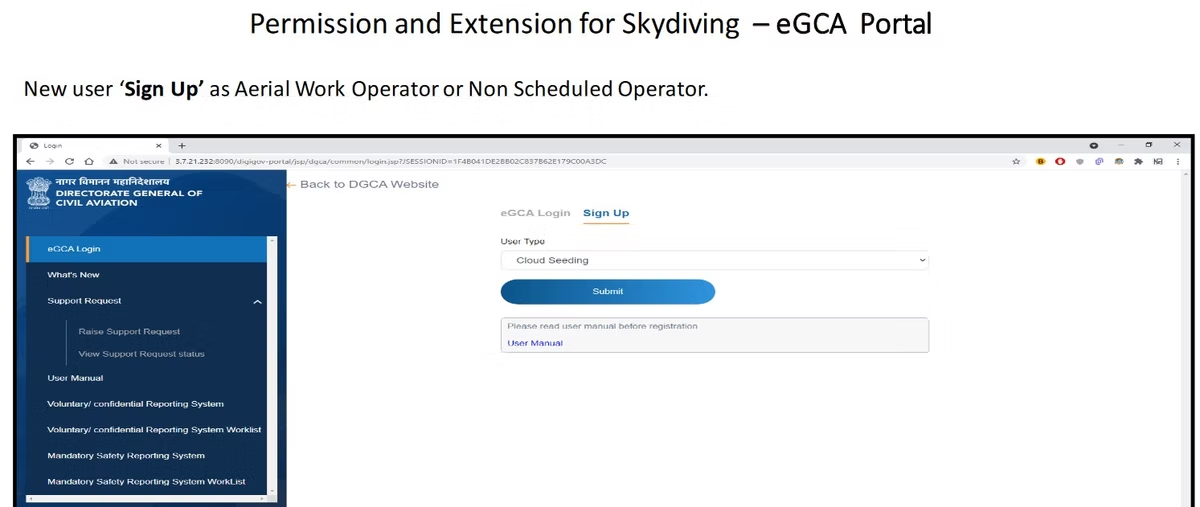
Open eGCA and log in. Go to the eGCA portal and select eGCA Login. If you already have your eGCA ID and password, sign in directly and skip to step 7.
-
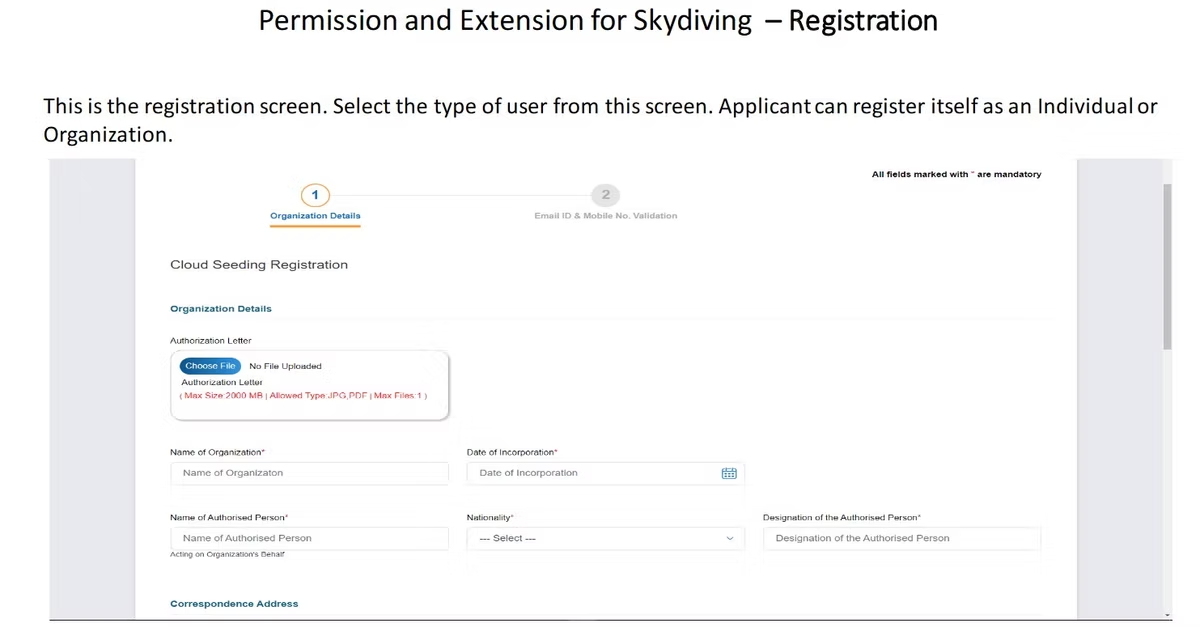
Register if you are a new user. New operators sign up as an Aerial Work Operator or a Non-Scheduled Operator. This is the registration stage, where you choose your user type as Individual or Organization. [VERIFY]
-
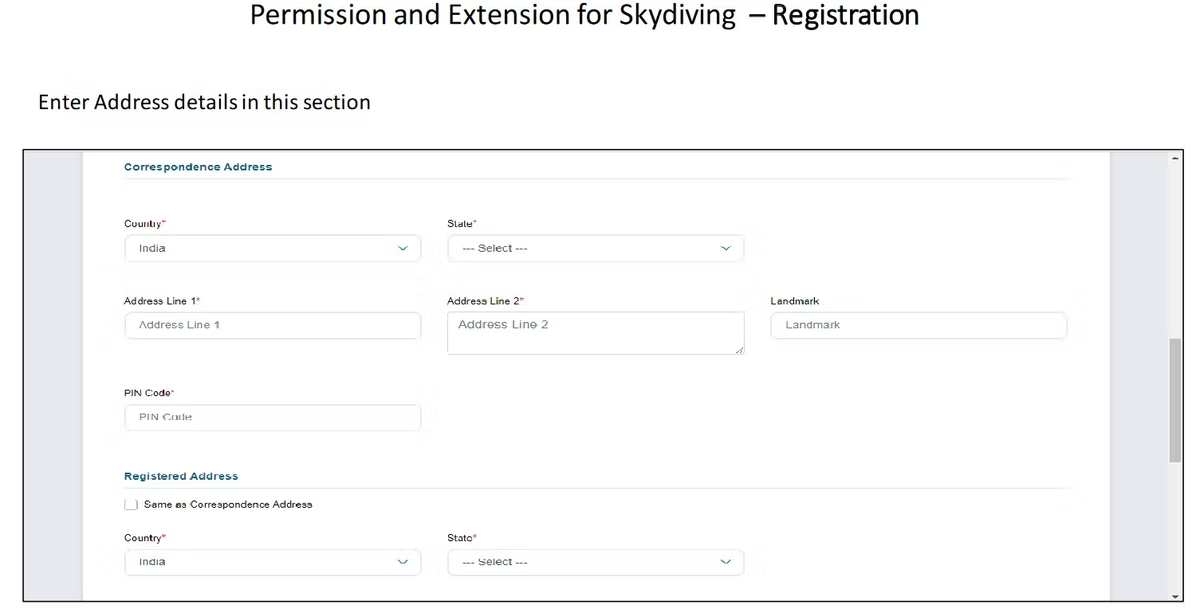
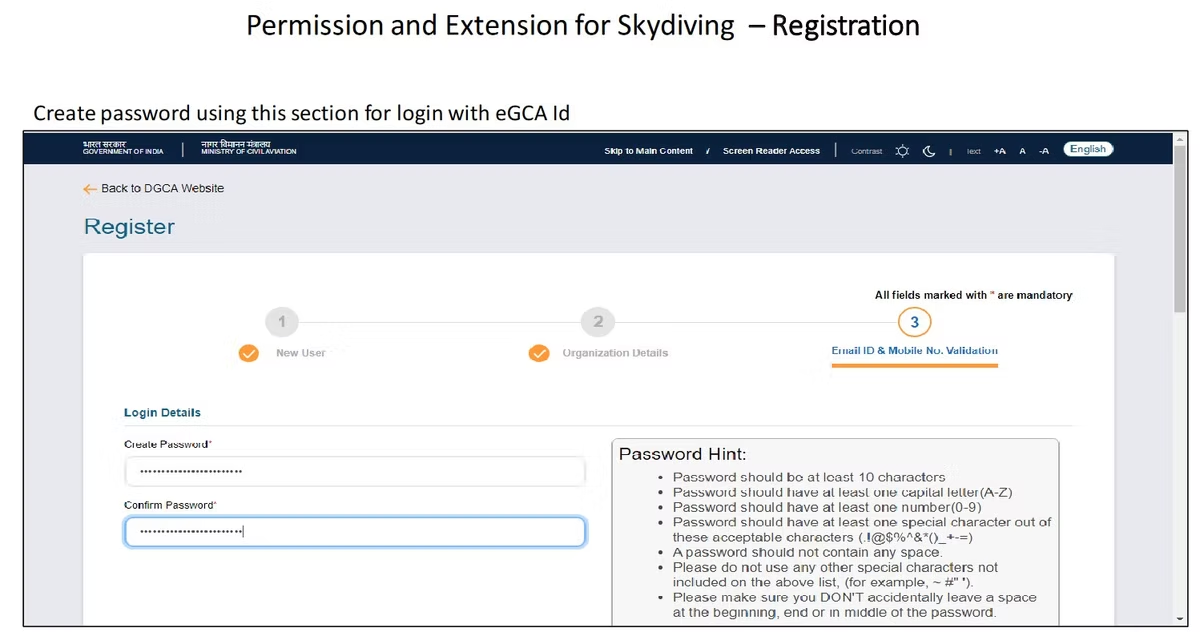
Enter your address details. Provide your address as requested and create a secure password that you will use to log in with your eGCA ID.
-
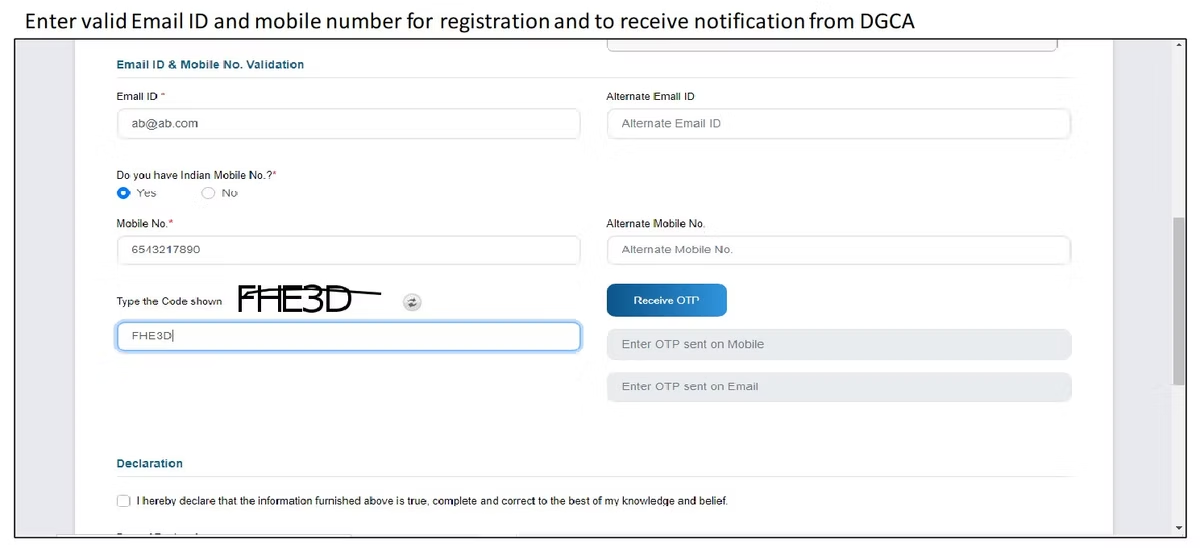
Add your contact details. Enter a valid email address and mobile number so DGCA can send you notifications and confirmations.
-
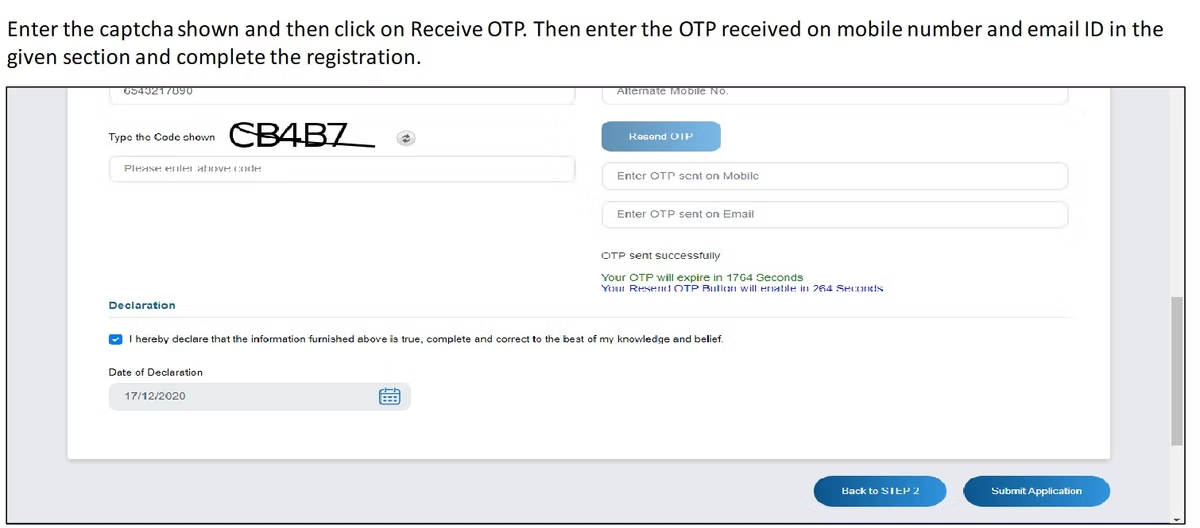
Verify with the OTP. Solve the captcha and select Receive OTP. Enter the one-time password sent to your mobile number and email address to complete registration. On success, your eGCA ID is generated and the registration details are sent to your email and mobile number.

-
Log back in. Sign in to the portal using your eGCA ID and the password you set.
-
Open Services. Once logged in, go to the Services area of your dashboard. [VERIFY]
-
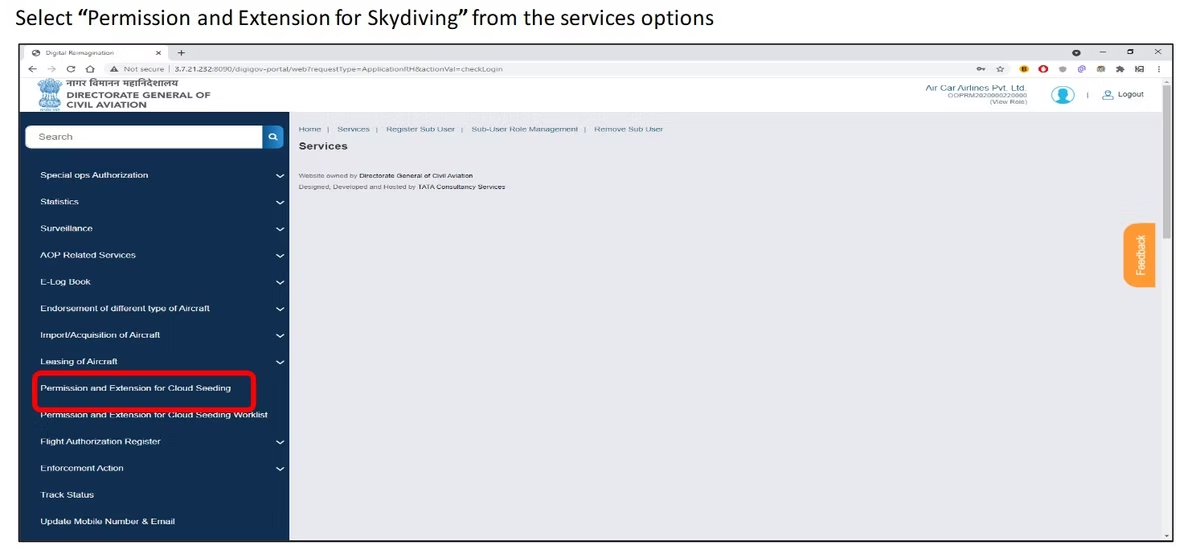
Select Permission and Extension for Skydiving. Choose this service from the list of available options. [VERIFY]
-
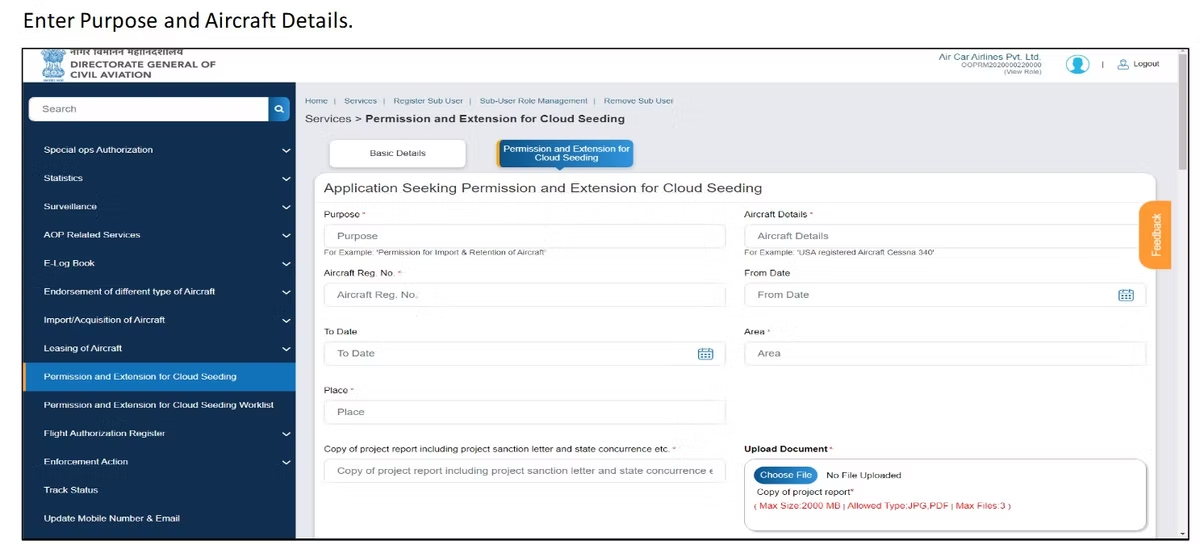
Enter the purpose and aircraft details. State the purpose of the skydiving activity and provide the required aircraft details for the operation.
-
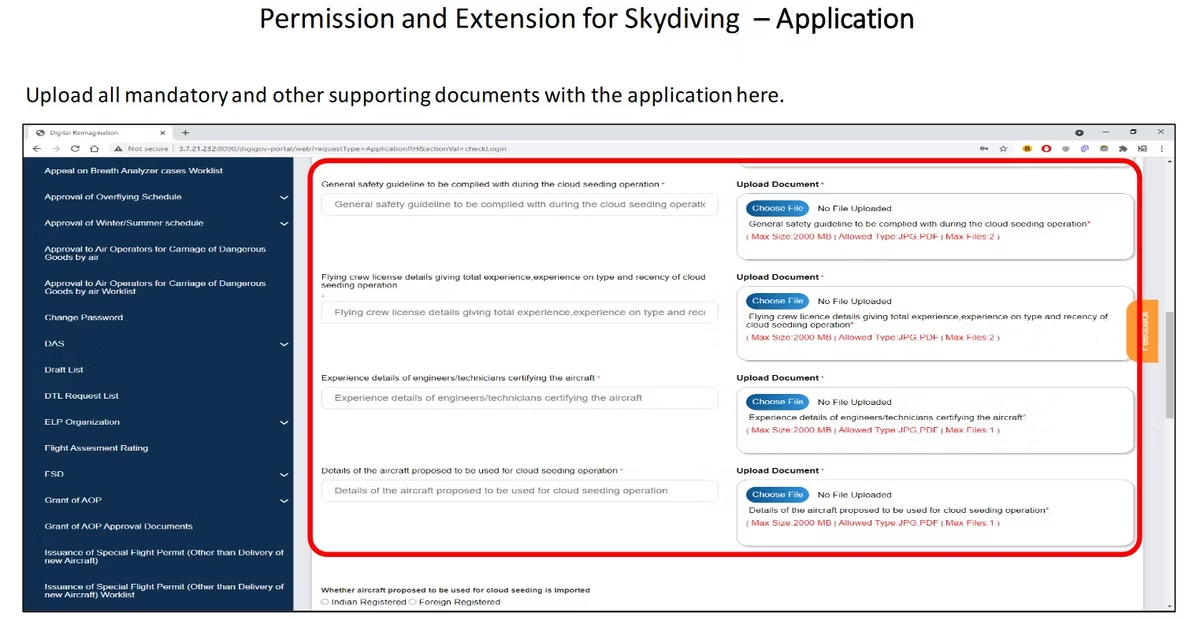
Upload your documents. Attach all mandatory documents along with any additional supporting material the application asks for.
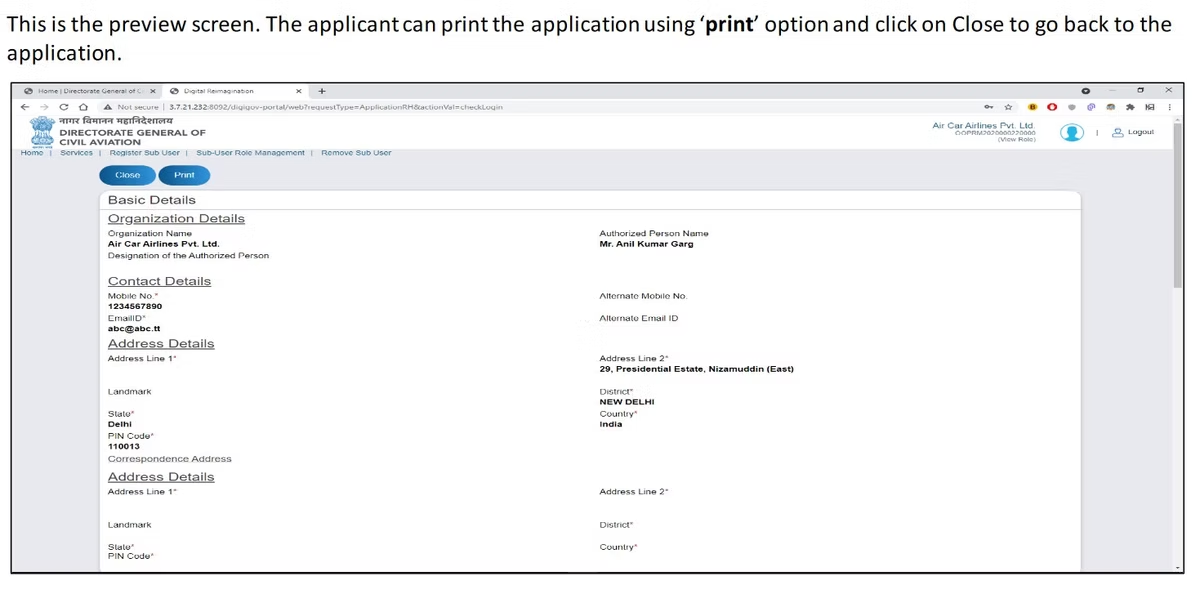
- Preview the application. Review the completed form. If everything is correct, you can print a copy for your records, or close the preview to go back and make edits.
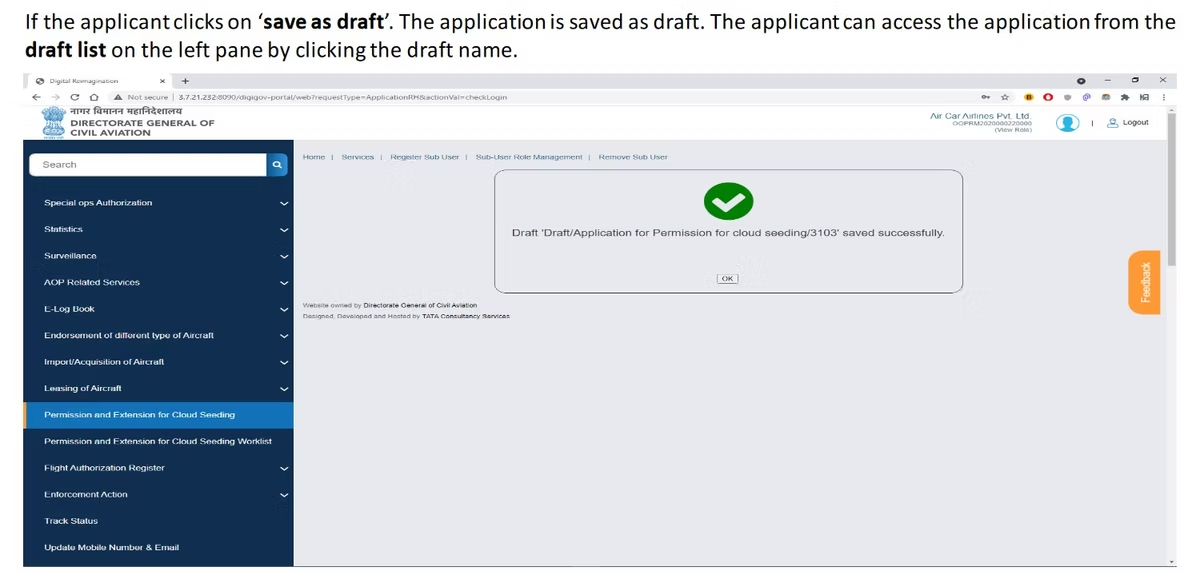
- Save as a draft if needed. If you are not ready to submit, save the application as a draft. You can reopen it later from the draft list in the left pane by selecting the draft name.
- Submit and note your eApplication ID. When you are satisfied, select Submit. The portal generates an eApplication ID. Keep this ID safe, as you will use it to track the progress of your application. [VERIFY]
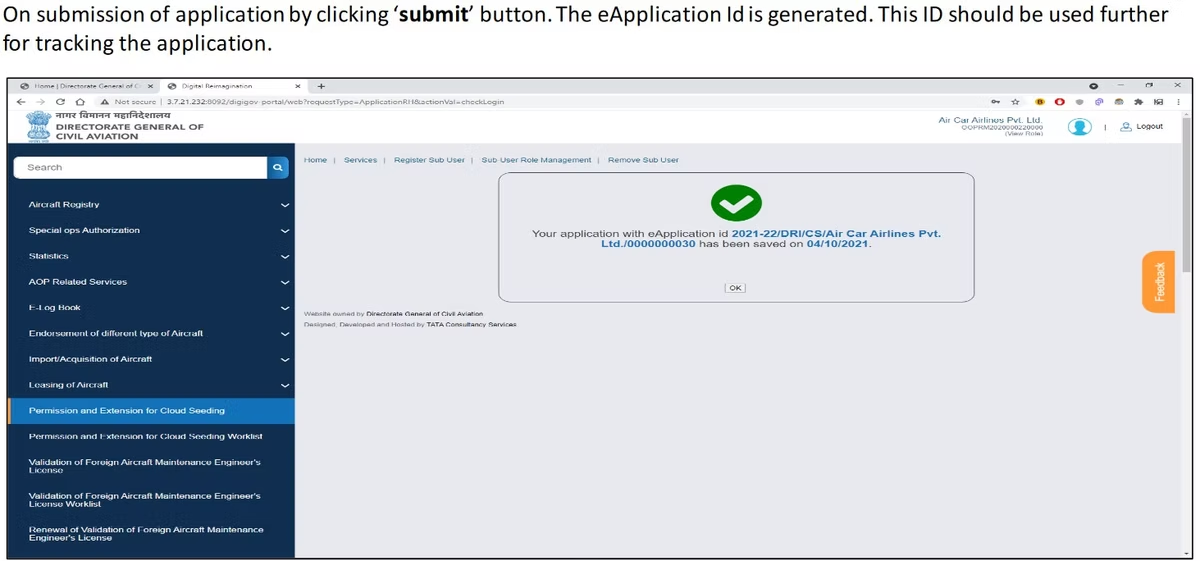
After submission, the application moves into DGCA review. You track its status from within your eGCA account using the eApplication ID, and any queries or approvals come through the email and mobile number on your record.
Application flow

Extending an existing permission
The same service covers extensions, which is why it is named Permission and Extension for Skydiving. If you already hold a permission and the activity runs past the original validity, apply for the extension through the same route rather than starting a fresh permission from scratch. Doing it before the current permission lapses keeps your operation continuously authorised and avoids a gap where jumps cannot legally take place. Apply in good time, since the application still goes through DGCA review. [VERIFY]
After approval: logging your skydiving operations
Once the permission is granted, the operational side begins, and that means flying and dropping to a schedule while keeping accurate records. Every flight that carries jumpers is aircraft time that the pilot in command needs to record, and clean records matter both for the operation and for the individual pilots building their hours. This is where a digital logbook earns its place. Wingman is a pilot logbook used by 30,000+ pilots across 400+ airlines, and it keeps hours, currency, and licence details in one place across iOS, Android, and Web.
Wingman is a global product rather than an India-only tool, and it supports DGCA among regulators including the FAA, EASA, UK CAA, GCAA, GACA, NZCAA, HKCAD, CASA, and CAAS. For pilots flying skydiving sorties under an Indian operator, there is a focused walkthrough on keeping a DGCA pilot logbook in India. There is a free tier up to 250 hours, so a pilot can start logging drop-zone flights without committing anything up front, and the Pro plan is available at $59 a year ($4.99 a month billed annually, or ₹4,499 a year in India) when you need the full feature set.
How this fits the wider eGCA picture
The skydiving permission is one of several operational services DGCA runs through eGCA, alongside licence and registration processes that pilots and operators use across their working lives. Knowing how the portal is laid out, and keeping one consistent eGCA login, makes each of these tasks easier the next time around. If you are still finding your way through the platform, the guides on getting your eGCA ID and the eGCA registration process are the best place to start.
Frequently asked questions
Who needs skydiving permission on eGCA?
The permission is for the entity running the operation, typically an aero club, an adventure-sports company, or a non-scheduled operator that wants to conduct skydiving from a specified aircraft. It authorises the activity itself rather than certifying an individual jumper, and it is applied for through the operator account on eGCA. [VERIFY]
Where do I find the skydiving permission service in eGCA?
After logging in, open the Services area of your dashboard and select Permission and Extension for Skydiving from the list of available options. You then enter the purpose of the activity and the aircraft details before uploading your documents and submitting. [VERIFY]
What is the eApplication ID and why does it matter?
When you submit the application, eGCA generates an eApplication ID. This is the reference you use to track the progress of your application through DGCA review, so keep it somewhere safe along with your eGCA login details. [VERIFY]
How do I extend an existing skydiving permission?
Use the same Permission and Extension for Skydiving service to apply for an extension, rather than starting a new permission. Apply before the current permission lapses so your operation stays continuously authorised while DGCA processes the extension. [VERIFY]
Do I need an eGCA account before I can apply?
Yes. The application runs entirely inside eGCA, so you need an eGCA ID first. If you do not have one, our guides on getting your eGCA ID and the eGCA registration process walk through setting up your login before you start the permission application.
← All articles