Roster Import
Feature overview
The roster import feature of Wingman Pilot Logbook allows you to seamlessly sync and log all your hours, direct from your roster. No more need to manually log your flights.
Try for Free5+ roster systems, 400+ airlines
- Works with major crew systems AIMS eCrew, ARMS, CAE Crew access, iFlight Lite, Sabre, Cesar, NavBlue RAIDO, Leon and many more.
- New airlines added every week ASL Airlines F, Air Asia X, Air Malta, AirTanker, Amapola Flyg, Atlas Air, Aurigny Air Services, Batik Air Malaysia, Binter Canarias, Blue Islands, Breeze Airways, Caribbean Airlines, CommutAir, DHL Aviation BSC, Eastern Airways, EuroAtlantic Airways, Flair Airlines, Fly Play hf, Flynas, Global Crossing Airlines, Gulf Air, Heston airline, Hong Kong Air Cargo Carrier Ltd., Horizon Air, Iberia Express, Insel Air, Israir, Jetsmart and more.
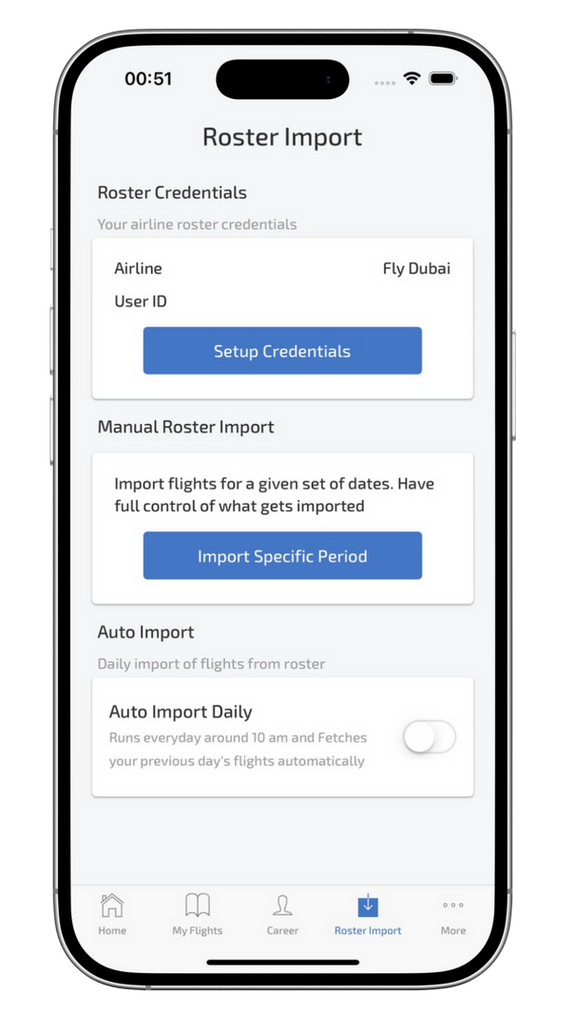
- Automatic daily import Wingman Pilot Logbook performs an automatic daily import around 0400 UTC, fetching the previous day's flight data.
- STEP 1: Open the Wingman Pilot Logbook app, go to the "Roster Import" page and click "Setup Credentials".
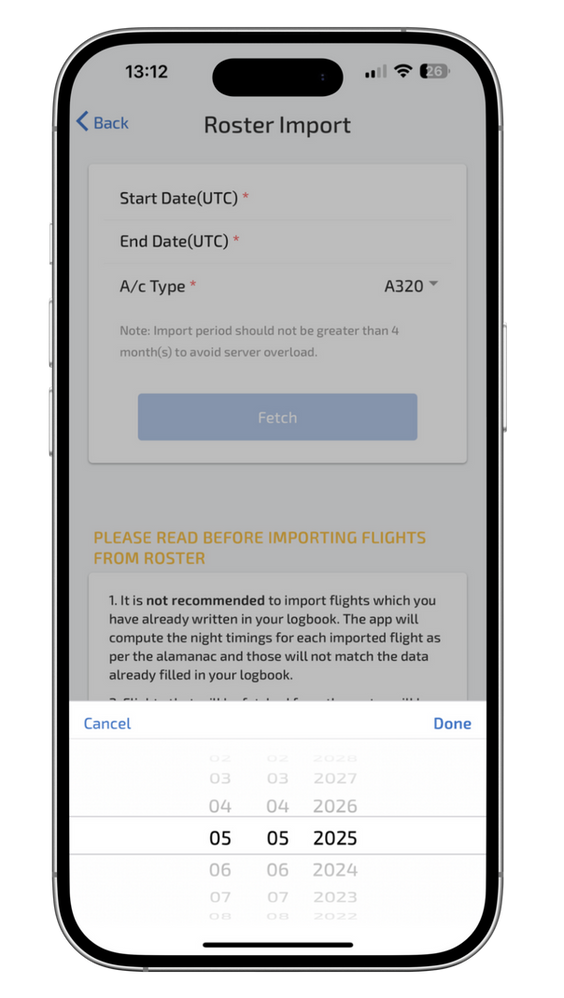
- STEP 2: Click "Import specific period". You can import up to 50 sectors in the free trial plan.
- STEP 3: Verify and import. All done.
Why pilots around the world love using this feature?
- Saves up to 5 hours a month.
- Works on any device. Android, iOS or web.
- Syncs roster data seamlessly with your logbook.
- No manual entry or typos.
- Privacy-focused, GDPR* compliant.
Frequently asked questions
How is Wingman Pilot Logbook's roster import different from other logbooks?
Unlike apps requiring CSV or PDF parsing, Wingman directly integrates with airline scheduling backends (like AIMS, ARMS, etc.), offering a cleaner, context-aware import, minimising formatting errors or duplicate logs.
Does the system deduplicate overlapping entries from multiple imports?
Yes. Wingman Pilot Logbook uses flight numbers, timestamps, and aircraft data to intelligently prevent duplicate entries during both manual and automatic sync.
What happens if my airline changes the roster after import?
You can re-import the updated roster for the same date range. Wingman Pilot Logbook compares timestamp hashes to identify and flag conflicts for manual review.
Can I control what gets imported (e.g., only block times, no sectors)?
Partial field imports aren't currently supported. All available fields from your roster (flight number, sector, aircraft type, etc.) are auto-fetched and prefilled. You may remove or adjust values before final import.
How secure are my airline login credentials?
Credentials are encrypted at rest and in transit using industry standards AES-256 and TLS 1.3. They are never stored permanently, just used for session-based fetch and discarded thereafter.
Can I schedule automatic imports at a custom time?
Not yet. Automatic imports are globally scheduled at 0400 UTC. Manual imports remain available anytime.
How does the system handle split duties (e.g., training flights, SIMs)?
Special duty codes are interpreted based on airline-specific mappings. SIM sessions, positioning, deadhead, and jumpseat legs are tagged accordingly and logged with remarks.
What about roster formats with incomplete data (e.g., no aircraft reg)?
Wingman Pilot Logbook allows you to configure a fallback default for missing fields (e.g., default aircraft type or reg) or prompts manual review for validation before log creation.
Can I batch-edit imported logs after import?
Yes. Use the multi-select mode in your flight list to bulk edit fields like aircraft type, remarks, or flight time.
Something beyond this? Just drop a message on the contact page